Notice. New forum software under development. It's going to miss a few functions and look a bit ugly for a while, but I'm working on it full time now as the old forum was too unstable. Couple days, all good. If you notice any issues, please contact me.
TassyJim Guru Joined: 07/08/2011 Location: AustraliaPosts: 6624
Posted: 08:25am 29 Aug 2026
Copy link to clipboard
Print this post
mmreplace.inf has everything that MMReplace needs
MMReplace gets the bas file path from %bas% which is the full path and name of the bas file.
I must admit that I haven't use MMReplace for a long time.
Jim Edited 2026-08-29 18:27 by TassyJimVK7JH MMedit
disco4now Guru Joined: 18/12/2014 Location: AustraliaPosts: 1157
Posted: 09:45am 29 Aug 2026
Copy link to clipboard
Print this post
MMReplace expects a line like below as the first line of the file. It is used to tell MMCC where to connect. However if MMCC is already be connected it is not required so should not be mandatory. As a work around add a target line like this, until I update to make it not mandatory. 'target port\com6:115200 s\picomite
Footnote added 2026-08-29 19:59 by disco4now
This is done in MMReplace.exe It is treating the passed INCLUDE file as relative to the location of the current file. Will need a code change to recognise when the drive has changed.F4H7FotSF4xGT
disco4now Guru Joined: 18/12/2014 Location: AustraliaPosts: 1157
ville56 Guru Joined: 08/06/2022 Location: AustriaPosts: 641
Posted: 11:05am 29 Aug 2026
Copy link to clipboard
Print this post
got it working now, thanks to your support.
Absolute filespecifiers and Jim's suggestion for #MODULE would be a big improvement, but this is only my POV. It would let one create a source library on the IDE side and make it easier to integrate changes in that lib into the sources which are referring them. Just a matter of "replace and deploy" instead of cutting out the old lib code and inserting the new one.
Gerald 73 de OE1HGA, Gerald
disco4now Guru Joined: 18/12/2014 Location: AustraliaPosts: 1157
Posted: 05:35am 30 Aug 2026
Copy link to clipboard
Print this post
MMReplace.EXE updated to accept Absolute or Relative path for #INCLUDE directive and also does not make a 'target entry mandatory. A relative path is determine by the include path starting with a period. It is specified relative to the directory where the currently selected file is located. #Include "../sptools/src/splib/math.inc" or as an absolute path #Include "C:/Users/gerry/Documents/MMBasic/sptools/src/splib/math.inc"
TassyJim Guru Joined: 07/08/2011 Location: AustraliaPosts: 6624
Posted: 07:29am 30 Aug 2026
Copy link to clipboard
Print this post
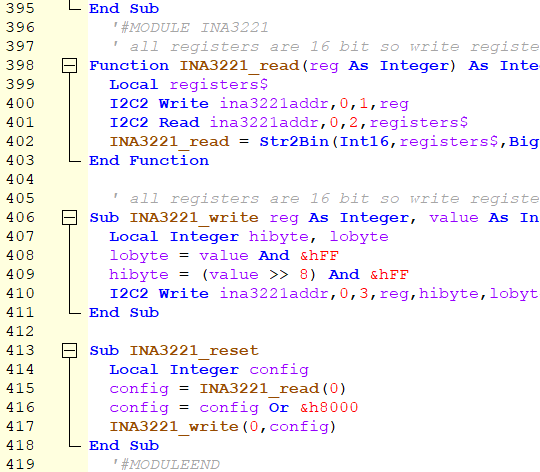
Gerry, This used the source before your change to INCLUDE paths. I have added code in 4 places. You should be able to find it by searching for tassyjim (in comments) So far, I have only returned the expanded file to MMEdit. Changes: before start of processing - globals and extractmodule procedure just after "wrong num parameters" - read preferences before debug directive - codebase and codemodule directives start of Production output - close files and write preferences
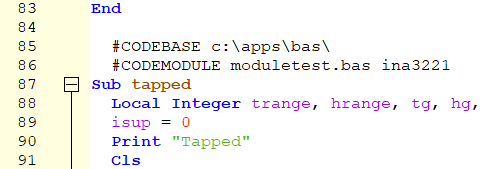
On first run, a file "MMmodule.inf is created in the MMEdit5 data folder The only entry is for the path to the module source files. They can be in a sub-folder. If blank, the absolute path is required for the source files, To change this base folder, use #CODEBASE folder$ in your .bas file
to insert a module, use #CODEMODULE modulefilename$ name$ module filename can include a path relative to the codebase folder no spaces in path
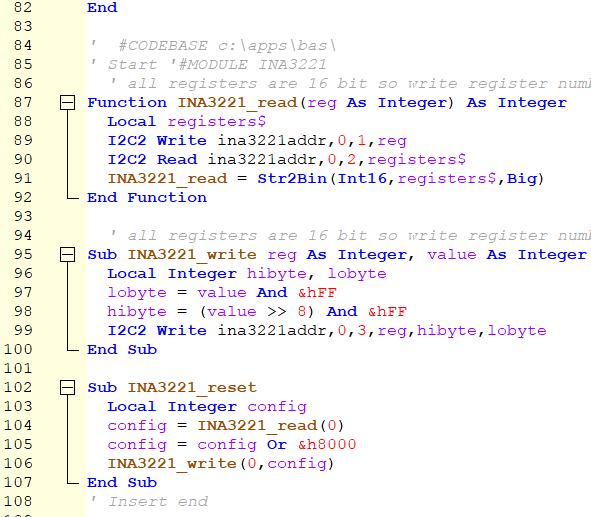
In the library/module files, start the module with '#MODULE name$ no quotes and no spaces conclude the module with '#MODULEEND
Permitted: any number of modules in any number of files.
@Jim: sorry, but can't get your version to work. I've done the following: - in user.tkn I have inserted all the new tokens (#CODEBASE #CODEMODULE #MODULE #MODULEEND). The tokens are now properly highlighted in the code.
- copied your binary to replace the old MMReplace.exe
- inserted the #codebase and #codemodule in the "main" and the #module and #moduleend in the "library".
on replace and deploy there is no errormessage but also no action except that the new tokens do not appear on the target (LIST) but the rest of the "main" code. No traces of the "library" code.
btw, if I understand it right, the #MODULE and #MODULEEND should not be a comment. I've tried both (commented out and in the code) but no effect.
And is it correct that your version does not require the path/file/module-names to be double-quoted? For Gerry's tokens (#INCLUDE) it is necessary.
Gerald Edited 2026-08-30 21:41 by ville56 73 de OE1HGA, Gerald
TassyJim Guru Joined: 07/08/2011 Location: AustraliaPosts: 6624
Posted: 09:00pm 30 Aug 2026
Copy link to clipboard
Print this post
'#MODULE and '#MODULEEND both need comments to allow the library file to run if required. no quotes around paths and filenames but no spaces in the names.
In my example the module is in c:\apps\bas\moduletest.bas
made up from c:\apps\bas\ (codebase) and moduletest.bas (filename)
Could you give me the exact #codebase and #codemodule in the "main" and the #module and #moduleend in the "library".
Also look at the contents of MMmodule.inf in the MMEdit5 data folder and make sure it matches the codebase path you entered.
Rather than replace and deploy, try replace. That should result in a new file opened in MMEdit
disco4now Guru Joined: 18/12/2014 Location: AustraliaPosts: 1157
Posted: 04:59am 31 Aug 2026
Copy link to clipboard
Print this post
Hi Jim, A few tweaks. I think an extra space when searching for the CODEMODULE name was stopping it working. I have changed the error reporting so the load is aborted if errors exist. I have tested Replace and Deploy, seems OK.
version$="5.21 - 31 Aug 2026" ; Jim's CODEMODULE added version$="5.22 - 31 Aug 2026" ; Jim's CODEMODULE Error messages for not found modules added ; Extra space removed from modstart$ = "'#MODULE" ; Error if no 'MODULEEND found ; Errors now use ShowFatalError() and abort the loading if an incorrect file
ville56 Guru Joined: 08/06/2022 Location: AustriaPosts: 641
Posted: 11:27am 31 Aug 2026
Copy link to clipboard
Print this post
Thanks Jim,
I have to apologize. But 2 weeks of toothache, an extracted tooth, an infection in the gum and being now more or less a permanent patient at the dentist did let me lack my concentration. After doing it right it worked immediately ...
Thanks again. This is a wonderful complement to the MMEdit IDE. Gerald 73 de OE1HGA, Gerald
ville56 Guru Joined: 08/06/2022 Location: AustriaPosts: 641
Posted: 05:58am 01 Sep 2026
Copy link to clipboard
Print this post
Hi Jim,
I still have some troubles with the library functions:
if there are more than one #MODULE /#MODULEEND in a library-file then - only the first entry is found - and the complete content of the lib-file is included
all other referenced entries throw an error.
In the example below if mod1 is uncommented, it is found but the whole file is included. If e.g. only mod3 is uncommented mod3 is not found.
Another issue is that if I align comments in MMEdit the '#MODULE becomes ' #MODULE which is not recognised by the program as module label any longer. Maybe you can treat '# and ' # the same. Same for #MODULEEND btw. Or is it possible to change the behavour of MMEdit so it does not insert a space after the ' ?
Hope I didn't make a fatal typo somewhere again ....
Thanks, Gerld Edited 2026-09-01 15:59 by ville56 73 de OE1HGA, Gerald
disco4now Guru Joined: 18/12/2014 Location: AustraliaPosts: 1157
Posted: 07:33am 01 Sep 2026
Copy link to clipboard
Print this post
Gerald
This should fix the handling of multiple modules.
I don't quite understand the align comments. Is this a formatting issue in MMEdit which adjusts the comments.
TassyJim Guru Joined: 07/08/2011 Location: AustraliaPosts: 6624
Posted: 08:15am 01 Sep 2026
Copy link to clipboard
Print this post
MMEdit changes '#... to ' #... when you "align comments" (adds a space) I can fix that There is also a problem loosing lines that start with '# (no space) I am not sure where that is happening.
I found a few other improvements but I need more time to test
Jim Edited 2026-09-01 18:17 by TassyJimVK7JH MMedit
disco4now Guru Joined: 18/12/2014 Location: AustraliaPosts: 1157
Posted: 08:51am 01 Sep 2026
Copy link to clipboard
Print this post
Hi Jim,
Are you referring to MMEdit or MMReplace.
I have fixed MMReplace to accept a library file that has comments aligned. sourceline$ = ReadString(fID) sourceline$=ReplaceString( sourceline$,"' #","'#")
ville56 Guru Joined: 08/06/2022 Location: AustriaPosts: 641
Posted: 10:18am 01 Sep 2026
Copy link to clipboard
Print this post
Gerry,
thanks for the MMReplace changes. Have done some basic testing and ut works now as expected. There is just one minor cosmetic issue with the comments you insert. A space is missing between
#MODULE and the modulename like:
' Start '#MODULEMOD1
fixing that would enhance readability.
Gerald 73 de OE1HGA, Gerald
disco4now Guru Joined: 18/12/2014 Location: AustraliaPosts: 1157
Posted: 11:08am 01 Sep 2026
Copy link to clipboard
Print this post
Jim The source and latest EXE that accepts '#MODULE or ' #MODULE in the library files and space added in the inserted comment.

 Notice. New forum software under development. It's going to miss a few functions and look a bit ugly for a while, but I'm working on it full time now as the old forum was too unstable. Couple days, all good. If you notice any issues, please contact me.


 Print this post