Notice. New forum software under development. It's going to miss a few functions and look a bit ugly for a while, but I'm working on it full time now as the old forum was too unstable. Couple days, all good. If you notice any issues, please contact me.
ville56 Guru Joined: 08/06/2022 Location: AustriaPosts: 641
Posted: 08:36am 14 Oct 2026
Copy link to clipboard
Print this post
from ther schematics: BLM18EG471SN1D
it is available from RS, DigiKey, Farnell and other big distris.
But basically this should be replaceable with a good old ferrite bead over a straight wire or with 2 or 3 turns if you don't dare to solder tiny SMDs. It's purpose is to avoid RF leaking back from the Wifi module into the supply which may cause all kind of interference in other parts of the PC3. It resembles a high impedance at 2.4 GHz and only 0.21 Ohm at DC. There is no guarantee that this will remedy the noise but it may contribute to reduction as stray RF is always a source of joy .... 73 de OE1HGA, Gerald
Mixtel90 Guru Joined: 05/10/2019 Location: United KingdomPosts: 9220
Posted: 09:13am 14 Oct 2026
Copy link to clipboard
Print this post
Adding inductance can also be a source of "joy" :( There will be a resonant LC circuit formed with the stray (or intentional) capacitance after it, which can just as easily make things even worse. Before incorporating LC filters (especially at high frequencies) you really need to know exactly what frequencies you are filtering, how the filter is going to handle them and be able to analyze the results.
Generally speaking it's preferable to simply make the supply rails as solid as possible, short lengths and good local decoupling. Avoid aluminium electrolytics (they are inductive). Tantalum caps are much better, as are MLCC, which can have the advantage of tiny lead lengths.Mick
mozzie Guru Joined: 15/06/2020 Location: AustraliaPosts: 468
Posted: 03:51pm 14 Oct 2026
Copy link to clipboard
Print this post
G'day, Just for the sake of testing, decided to try plugging / connecting a heap of things onto the PC3 running RC1 to see how it went:
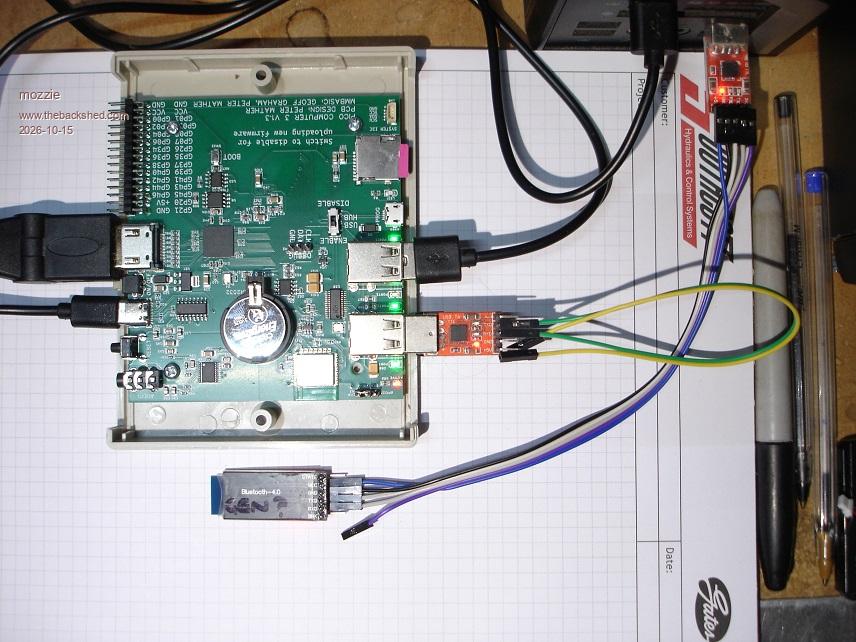
Bluetooth Keyboard / Mouse combo Bluetooth serial HM10 module (COM7) Bluetooth speaker (Milwaukee M12) USB Wireless Keyboard / Mouse combo FT232 TTL / Serial converter (COM3) 7" HDMI Monitor with 10 point CAP-Touch screen Music on SDCard
Running 1024 x 600 in mode 3
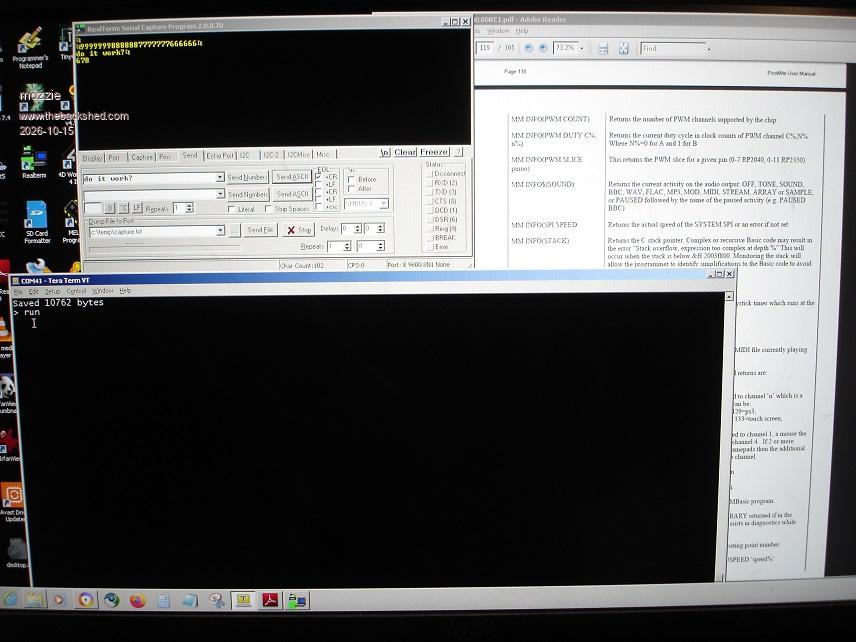
The FT232 has RX-TX looped to send back anything it receives. The HM10 serial module is connected via another FT232 to the PC.
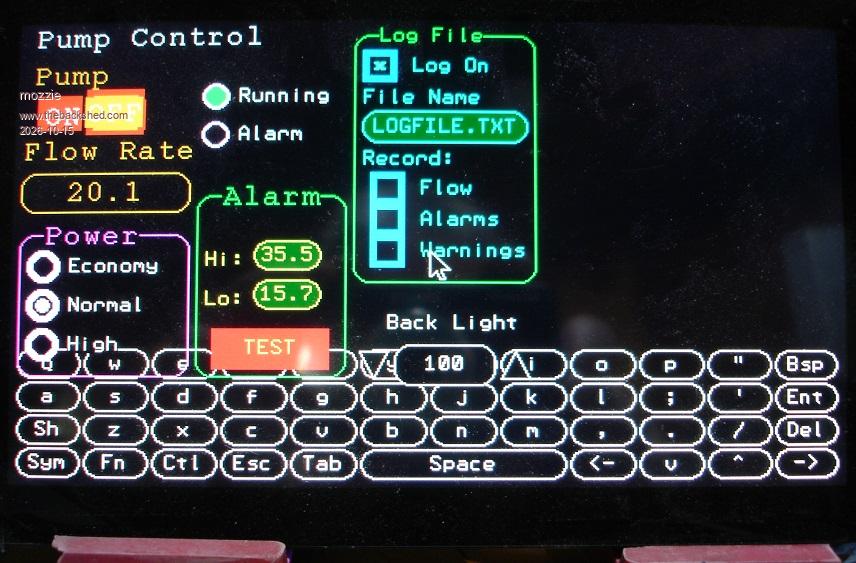
A slightly modified version of the PUMP-TEST program to send all recieved keypresses to COM3 and then from COM3 to COM7 via interrupt routines Anything received from COM7 (PC) is sent to COM3 via interrupt routine and then is sent back to COM7 and back to PC Play audio from b: to BT speaker
And it all just works
Typing on touch screen / USB keyboard / BT Keyboard / Console Keyboard all working together. Touch Screen / USB Mouse / BT Mouse all working with the Pump-Test GUI system. Music keeps playing, no gaps noticed
Whilst I guess this is not stressing the processor it shows the peripherals are pretty steady. Only issue so far is getting enough 5V current to power everything.
Overall very impressed with the PC3, my thanks to Peter and everyone else involved for making this possible
Next test is Bluetooth and Stepper system to see how that goes. But thats tomorrow (ok, later today), its time for bed
Regards, Lyle.
PhenixRising Guru Joined: 07/11/2023 Location: United KingdomPosts: 2097
Posted: 04:03pm 14 Oct 2026
Copy link to clipboard
Print this post
Any chance of a pic, please?
mozzie Guru Joined: 15/06/2020 Location: AustraliaPosts: 468
Posted: 04:43pm 14 Oct 2026
Copy link to clipboard
Print this post
G'day Phenix, No problems but nothing too exiting to look at:
PC3 / BT modules / FT232 ETC
Pump Test needs to be re-sized to suit on screen keyboard
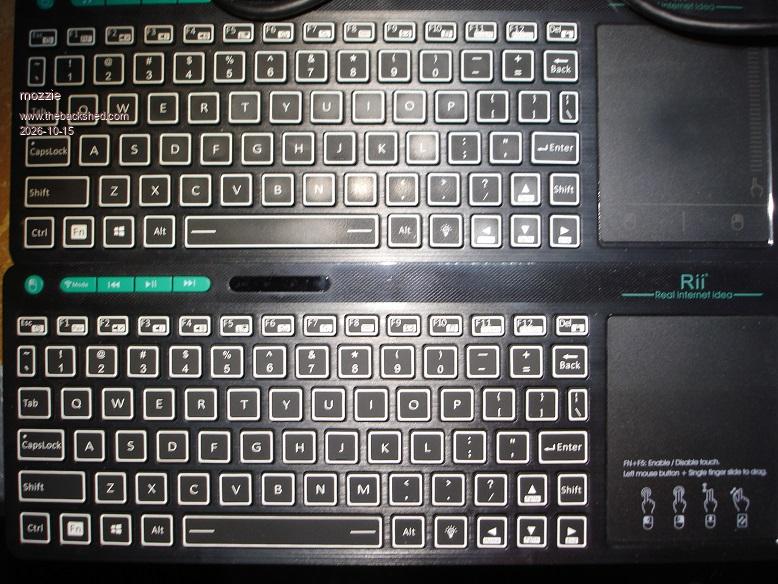
Keyboards, upper is USB-Wireless, lower is Bluetooth (can be very confusing)
Teraterm as console, Realterm talking to FT232/HM10
The "experimenters bench" looks like a nuclear blast so no overall pics I'm afraid. The occasional ant is moving real fast from all the absorbed coffee
Regards, Lyle.
PhenixRising Guru Joined: 07/11/2023 Location: United KingdomPosts: 2097
Posted: 09:02am 15 Oct 2026
Copy link to clipboard
Print this post
"a picture paints a thousand words"
Looks great
dddns Guru Joined: 20/09/2024 Location: GermanyPosts: 924
Posted: 10:44am 15 Oct 2026
Copy link to clipboard
Print this post
@ville56 Thanks again for your suggestions. I implemented all of them and it reduced the noise to a minimum which is absolutely ok now.
ville56 Guru Joined: 08/06/2022 Location: AustriaPosts: 641
Posted: 01:10pm 15 Oct 2026
Copy link to clipboard
Print this post
Peter,
with PicoMitePC3 MMBasic USB RP2350B Edition V7.00.00RC1
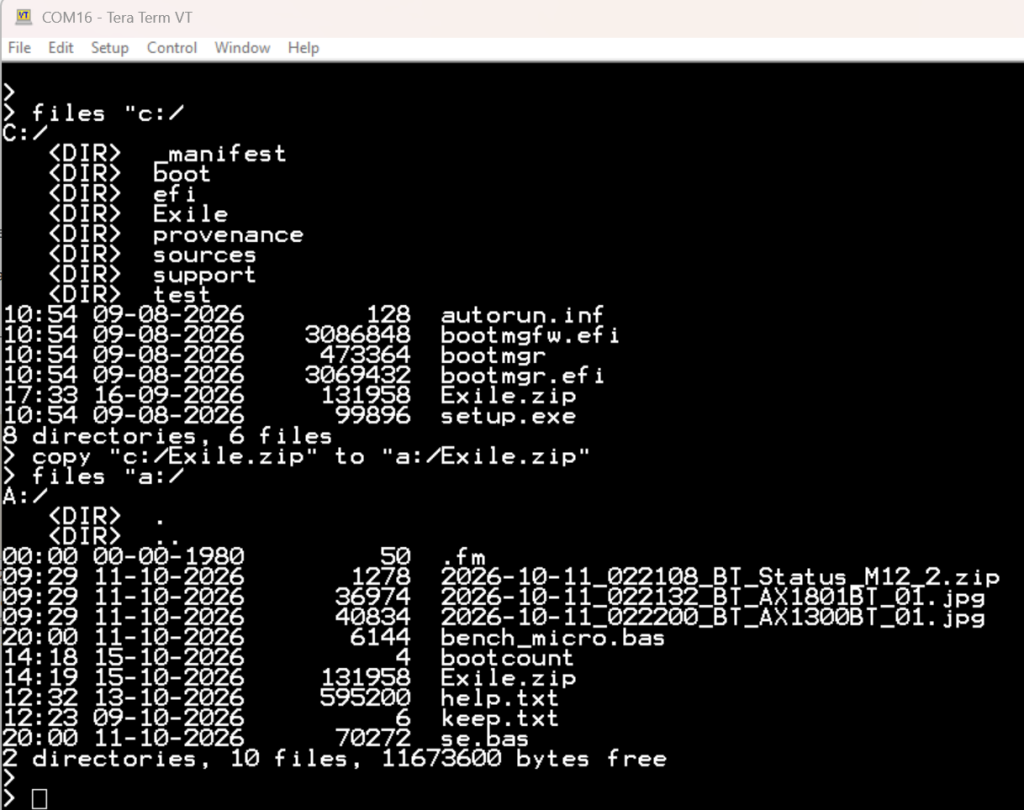
I have a problem copying files from C: to A: drive. Not even a file with about 15kB is properly copied.
For example c:c.jpg with 14726 bytes is copied to a: with 5120 bytes. As the copied part of the jpg can be displayed I assume the copy just stops after a few 1000 bytes.
After the copy operation the drive c: is partially inaccessible and behaves strange.
so d.jpg is deleted but every access to a specific file (LOAD JPG) results in an error and takes a long time.
I've tried this with an USB drive and a SD card with an USB adapter, both behave identical.
Gerald 73 de OE1HGA, Gerald
matherp Guru Joined: 11/12/2012 Location: United KingdomPosts: 12034
Posted: 01:23pm 15 Oct 2026
Copy link to clipboard
Print this post
I would suspect your flash drive is corrupt or similar
Mixtel90 Guru Joined: 05/10/2019 Location: United KingdomPosts: 9220
Posted: 01:28pm 15 Oct 2026
Copy link to clipboard
Print this post
Was your test carried out with a USB memory stick? Did it work on earlier versions?
AFAIK SD card adapter sticks and USB drives don't work in quite the same way and I'm not sure if they are supported. USB on the Picomite is restricted compared to "full" OS systems.Mick
ville56 Guru Joined: 08/06/2022 Location: AustriaPosts: 641
Posted: 01:44pm 15 Oct 2026
Copy link to clipboard
Print this post
I've tried it on both, stick and adapter, and they have the same issue. Have to dive deeper into that. And no, I didn' t try it on RC0 which is the only older version available. 73 de OE1HGA, Gerald
dddns Guru Joined: 20/09/2024 Location: GermanyPosts: 924
Posted: 01:54pm 15 Oct 2026
Copy link to clipboard
Print this post
I have transferred an MP3 file via tftp. This has the same size as the source according to files or fm. If I replay this file it has errors and jumps what you can hear. If I copy that file it fails or only copies fragments. It seems to be corrupt. Other files I copied with my PC to the stick are copied from C: to A: in a speed I have never seen like 500Kb/s
ville56 Guru Joined: 08/06/2022 Location: AustriaPosts: 641
Posted: 02:05pm 15 Oct 2026
Copy link to clipboard
Print this post
Peter,
I have now flashed onto the PC3 PicoMiteHDMI MMBasic USB RP2350B Edition V7.00.00RC1 and that version works ok.
The version with the issue is PicoMitePC3 MMBasic USB RP2350B Edition V7.00.00RC1
I hope I've not used the wrong version before ...
Edit: seems to be a problem with pico flash artefacts!!
After trying the PicoMiteHDMI version which worked, I reflashed PicoMitePC3 and now it magically also works. I've only changed the resolution to 1024 on both versions due to sync probs on my HDMI monitor, all other optons were left to default. The drive a: was also preserved and ok as was copying files from c: to a:. OK, so at least I know for the next time where to look first ... . Maybe a flash nuke upfront would have avoided it. Edited 2026-10-16 00:27 by ville56 73 de OE1HGA, Gerald
matherp Guru Joined: 11/12/2012 Location: United KingdomPosts: 12034
Posted: 02:23pm 15 Oct 2026
Copy link to clipboard
Print this post
I was testing on the PC3 version. The other possibility is power supply. PC3 starts up the WIFI chip and HDMIUSB doesn't so if the power is marginal.... Edited 2026-10-16 00:27 by matherp
ville56 Guru Joined: 08/06/2022 Location: AustriaPosts: 641
Posted: 02:29pm 15 Oct 2026
Copy link to clipboard
Print this post
Yes, power could also be a source of troubles, thanks for that input. I will consider that as well next time.
Note: I've tried the config now with Wifi, SD-card and USB-stick all at the same time but it is stable. So powersupply seems not to be a problem. Still blame it on the pico flash ... Edited 2026-10-16 01:27 by ville56 73 de OE1HGA, Gerald
homa Guru Joined: 05/11/2021 Location: GermanyPosts: 715
Posted: 09:34pm 17 Oct 2026
Copy link to clipboard
Print this post
PicoMitePC3 RC1 – FRAMEBUFFER LAYER in MODE 3 fails
Hi Peter,
on the PC3 (PicoMitePC3 V7.00.00RC1, OPTION LIST below), directly at the prompt:
NEW MODE 3 FRAMEBUFFER LAYER Error : Layer Buffer must be in tightly coupled RAM
The manual lists HDMI mode 3 with automatic layer. Is the layer in mode 3 possible on the PC3 (PSRAM fitted), or is this a known limit?
Matthias
> option list PicoMitePC3 MMBasic USB RP2350B Edition V7.00.00RC1 OPTION SERIAL CONSOLE COM2,GP8,GP9 OPTION SYSTEM I2C GP20,GP21 OPTION FLASH SIZE 16777216 OPTION COLOURCODE ON OPTION KEYBOARD GR, 0, 1, 200, 75 OPTION HEARTBEAT OFF OPTION PICO OFF OPTION RESOLUTION 640x480 @ 315000KHz OPTION HDMI PINS 1, 3, 5, 7 OPTION WIFI behofam, *****************, Pico3, DE OPTION TELNET CONSOLE ON OPTION SDCARD GP33, GP30, GP31, GP28 OPTION KEYBOARD REPEAT 200,75 OPTION AUDIO I2S GP10,GP22', ON PWM CHANNEL 11 OPTION RTC AUTO ENABLE OPTION COUNT GP34,GP35,GP36,GP37 OPTION COMPILE ON OPTION PLATFORM PICO COMPUTER 3 OPTION PSRAM PIN GP47 >
matherp Guru Joined: 11/12/2012 Location: United KingdomPosts: 12034
Posted: 07:18am 18 Oct 2026
Copy link to clipboard
Print this post
This is the limitation of having lots of memory tied up for bluetooth and web use. I'll update the manual to identify modes which won't be available on the PC3 build
homa Guru Joined: 05/11/2021 Location: GermanyPosts: 715
Posted: 08:13am 18 Oct 2026
Copy link to clipboard
Print this post
Oh, that's really unfortunate. I like the layer principle and Mode 3. Do you see any chance of that happening in the future? At least one :)
Mixtel90 Guru Joined: 05/10/2019 Location: United KingdomPosts: 9220
Posted: 08:36am 18 Oct 2026
Copy link to clipboard
Print this post
When Raspberry Pi make a new, upgraded model with more RAM to replace the RP2350n? Having "proper" fast RAM available is the thing. Everything is a compromise.Mick
matherp Guru Joined: 11/12/2012 Location: United KingdomPosts: 12034
Posted: 08:45am 18 Oct 2026
Copy link to clipboard
Print this post
Not on the rp2350B, it simply doesn't have enough memory and psram is too slow. The same effect can be simulated by using blit framebuffer. Or just use the HDMIUSB build if you don't need Web or Bluetooth
Page 2 of 3
Print this page
The Back Shed's forum code is written, and hosted, in Australia.

 Notice. New forum software under development. It's going to miss a few functions and look a bit ugly for a while, but I'm working on it full time now as the old forum was too unstable. Couple days, all good. If you notice any issues, please contact me.


 Print this post



 . Maybe a flash nuke upfront would have avoided it.
