Notice. New forum software under development. It's going to miss a few functions and look a bit ugly for a while, but I'm working on it full time now as the old forum was too unstable. Couple days, all good. If you notice any issues, please contact me.
matherp Guru Joined: 11/12/2012 Location: United KingdomPosts: 12034
Posted: 05:33pm 26 Apr 2026
Copy link to clipboard
Print this post
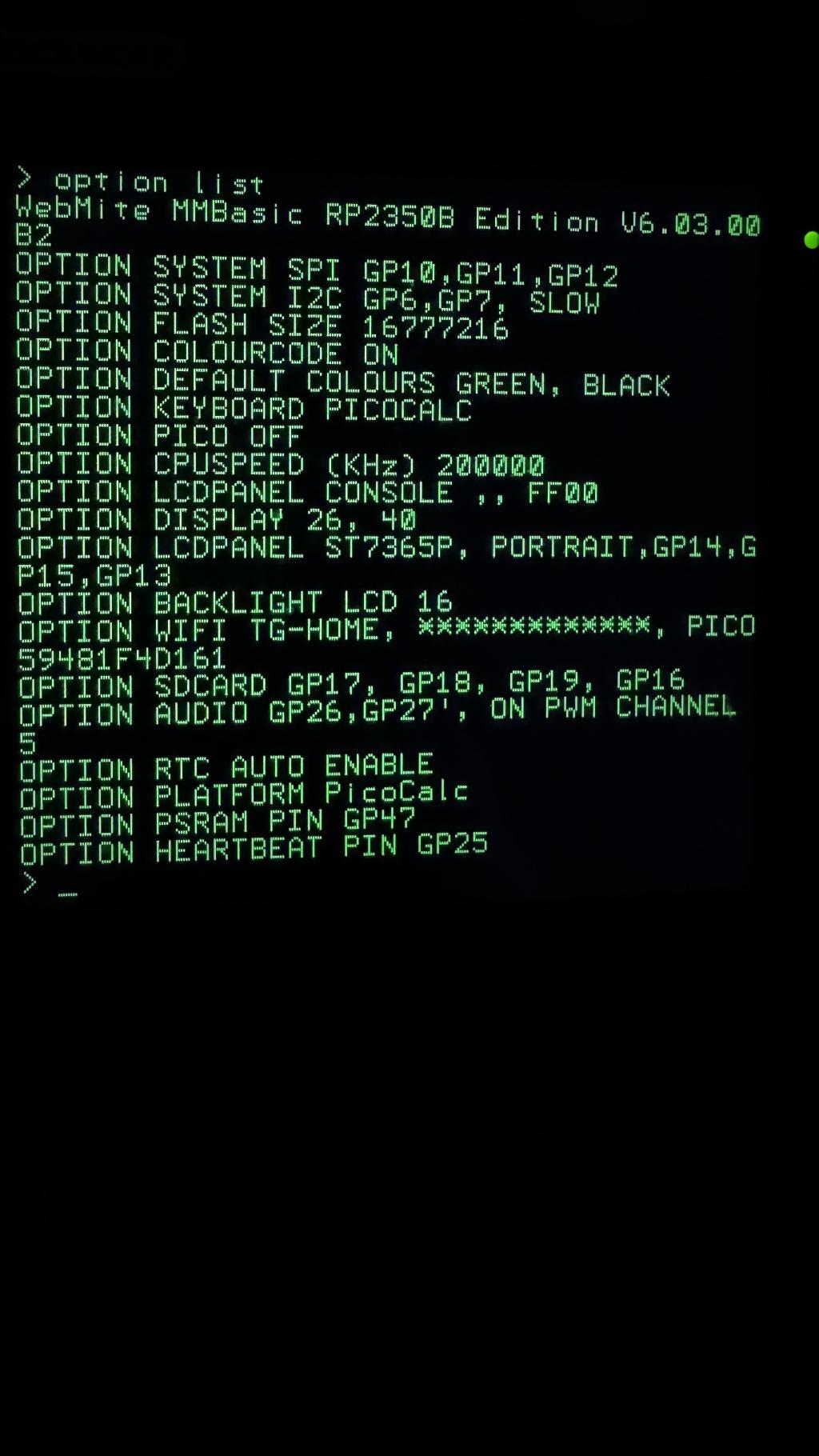
The manual example worked for me on a RP2350B Pimoroni Plus W as did Geoff's watering controller (much bigger program) What options have you got set? Try lowering the cpuspeed if above 200MHz. The RP2350B Pimoroni Plus W doesn't seem to like overclocking, or at least mine doesn't.
terekgabor Senior Member Joined: 02/01/2026 Location: HungaryPosts: 153
Posted: 05:50pm 26 Apr 2026
Copy link to clipboard
Print this post
I lowered the CPU speed to 200MHz, same problem. Options attached.
If I put End before json$ the program stops normally. And from command prompt I can print json$, but in the program causes restart.
G@bor
matherp Guru Joined: 11/12/2012 Location: United KingdomPosts: 12034
Posted: 06:07pm 26 Apr 2026
Copy link to clipboard
Print this post
Have you got a standard pico2-W you can test with?
terekgabor Senior Member Joined: 02/01/2026 Location: HungaryPosts: 153
Posted: 06:13pm 26 Apr 2026
Copy link to clipboard
Print this post
Yes I have, and first I have to step back to B1 for a try. Then nuke again and B2 again.
I tried print json$(…) and also xy$=json$(…) in the program , restart immediately. I also try to relocate this section of the program without success.
G@bor
matherp Guru Joined: 11/12/2012 Location: United KingdomPosts: 12034
Posted: 06:38pm 26 Apr 2026
Copy link to clipboard
Print this post
List your version of the program - leave the code out I've got my own
terekgabor Senior Member Joined: 02/01/2026 Location: HungaryPosts: 153
Posted: 06:45pm 26 Apr 2026
Copy link to clipboard
Print this post
Peter!
first test: I did step back to B1, no problem with it. Then upgrade again to B2, problem came.
second test: I cut this part from my "big" program to a new one - only some lines I attached. Not working wiht B2, when reaches last line json$, restarting.
Same options,same Picocalc, same Pimoroni Pico Plus 2 W test2.zip
If I will have time today I will change to normal Pico 2 W, if not I think next day is Thursday - I will leave for a business trip.
G@bor
terekgabor Senior Member Joined: 02/01/2026 Location: HungaryPosts: 153
Posted: 07:21pm 26 Apr 2026
Copy link to clipboard
Print this post
Peter!
Third test: I put ‘end’ in the test2.bas program before the last line (which is containing json$). Program ran without error. Then try Print json$(wthr(),”timezone_offset”) or also tzo$= json$(wthr(),”timezone_offset”) from command prompt. System restarted in both case. I think something with json function can cause this.
G@bor
matherp Guru Joined: 11/12/2012 Location: United KingdomPosts: 12034
Posted: 07:13am 27 Apr 2026
Copy link to clipboard
Print this post
G@bor
Please try this version which has the cache functionality disabled and should be pretty much identical to B1
The issue is almost certainly the build running out of C heap but I don't know why. Edited 2026-04-27 17:14 by matherp
WhiteWizzard Guru Joined: 05/04/2013 Location: United KingdomPosts: 2994
Posted: 08:55am 27 Apr 2026
Copy link to clipboard
Print this post
@Peter - I had one of your 64-pin DIL modules running B1 this morning so decided to upgrade to B2. I first ‘nuked’ it, then installed B2 (‘boot’-‘reset’ presses to get the module ready for the B2 .uf2.
The upgrade went as expected, but when checking the A: drive, I saw that the previous contents were still in tact.
Shouldn’t Nuke have totally cleared the whole Pico?
To add also that I loaded a .bas from A: (the one that was still unexpectedly there) and it ran perfectly!?! Edited 2026-04-27 19:13 by WhiteWizzard
Volhout Guru Joined: 05/03/2018 Location: NetherlandsPosts: 6184
terekgabor Senior Member Joined: 02/01/2026 Location: HungaryPosts: 153
Posted: 02:18pm 27 Apr 2026
Copy link to clipboard
Print this post
Hello Peter!
Thanks! I can try it later in the week. I am on a business trip just now.
I will feed back immediately.
G@bor
PhenixRising Guru Joined: 07/11/2023 Location: United KingdomPosts: 2098
Posted: 02:56pm 27 Apr 2026
Copy link to clipboard
Print this post
Whoa...Whoa...Whoa
What the heck???
Older version NO optimizing: 16000/sec Older version WITH optimizing: 12000/sec
V6.03.00B1 WITH optimizing:37000/sec
Awesome, many thanks Pete
JanVolk Guru Joined: 28/01/2023 Location: NetherlandsPosts: 420
Posted: 08:40pm 27 Apr 2026
Copy link to clipboard
Print this post
Peter,
The freezing problems and issues with I2CLCD no longer occur after some hardware adjustments. I switched to a standard Raspberry Pi Pico 2 and soldered the I2C pull-up resistors directly onto the Pico module due to the poor connections on the breadboard. I also have a Raspberry Pi Pico 2 W on which I had mounted female connectors with long pins, which caused poor contact, so I replaced these with male long pins. I am currently running a test with PicoMite MMBasic RP2350A V6.03.00B2 and PicoMite MMBasic RP2040 V6.03.00B2. The program is far from finished, and I can continue working.
Thanks for your input and also for the great new developments in PicoMite MMBasic.
Jan.
ville56 Guru Joined: 08/06/2022 Location: AustriaPosts: 641
Posted: 02:05am 28 Apr 2026
Copy link to clipboard
Print this post
@Peter,
in the example attached below, the select case asc(in_char) is not properly executed if option tracecache is enabled
Option profiling on Option tracecache on
Option EXPLICIT Option DEFAULT NONE
Dim string in_char
On key key_isr
'---------------------------------------- Do If Asc(in_char) = 13 Then End Loop '-----------------------------------------
Sub key_isr 'Local string in_char
in_char = Inkey$
Print Asc(in_char)
Select Case Asc(in_char) Case 10,13 Print "cr/lf"
Case Else Print "other char" End Select
End Sub
environment is: PicoMite MMBasic RP2350B V6.03.00B2 OPTION SYSTEM SPI GP10,GP11,GP12 OPTION FLASH SIZE 16777216 OPTION COLOURCODE ON OPTION PICO OFF OPTION CPUSPEED (KHz) 292000 OPTION DISPLAY 40, 145 OPTION SDCARD GP9 OPTION PSRAM PIN GP8
NB: it works with SELECT CASE if TCF_IF is selectively set to 0. Otherwise only the CASE ELSE path is taken. Edited 2026-04-28 16:05 by ville56 73 de OE1HGA, Gerald
matherp Guru Joined: 11/12/2012 Location: United KingdomPosts: 12034
Posted: 09:14am 28 Apr 2026
Copy link to clipboard
Print this post
ville56: thanks for the report - will look at it. It may be a few days as MMBasic is in bits at the moment with the attempt to get to B3.
ville56 Guru Joined: 08/06/2022 Location: AustriaPosts: 641
Posted: 11:15am 28 Apr 2026
Copy link to clipboard
Print this post
Thanks Peter, no hurry. MMBasic is still a hobby and not a professional project and I really admire what you have accomplished with MMBasic until now and the journey still goes on. Just incredible!!!
Gerald
NB: I wish all the professional (and really expensive) pieces of software I had to use during my 40-year IT-career had that kind of profound quality and quick support as you give. And I am talking about the big blue and grey companies. I'm not saying they were awfully bad in support, but you somehow play in your own league. 73 de OE1HGA, Gerald
homa Guru Joined: 05/11/2021 Location: GermanyPosts: 715
Posted: 10:36pm 28 Apr 2026
Copy link to clipboard
Print this post
@Peter A small request or suggestion for improvement. When programs are launched via FM and finish running, the screen unfortunately clears immediately and returns to FM. It would be nice to have an option to wait for a key press first, so you can read the text or view the output in general if necessary. Perhaps this behavior could even be selected with an “OPTION CLI-WAIT ENABLE/DISABLE” or something similar.
Matthias
EDNEDN Guru Joined: 18/02/2023 Location: United StatesPosts: 308
Posted: 03:38am 29 Apr 2026
Copy link to clipboard
Print this post
Yes. An option would be nice. But it would also be nice to have some keyboard behavior that overrides the option.
I know it is too much to hope for. But if the option was "no wait, and close out the screen", It would still be nice to have the file manager recognize the program was launched with a Shift_Enter (or any other convenient modified Enter) and override the default and wait.
matherp Guru Joined: 11/12/2012 Location: United KingdomPosts: 12034
Posted: 07:20am 29 Apr 2026
Copy link to clipboard
Print this post
Do:Loop While Inkey$=""
homa Guru Joined: 05/11/2021 Location: GermanyPosts: 715
Posted: 03:56pm 29 Apr 2026
Copy link to clipboard
Print this post
I had a feeling this would happen. After all, we're lazy and don't want to have to update this in every single program. But OK, you're the lead developer.
Page 3 of 6
Print this page
The Back Shed's forum code is written, and hosted, in Australia.

 Notice. New forum software under development. It's going to miss a few functions and look a bit ugly for a while, but I'm working on it full time now as the old forum was too unstable. Couple days, all good. If you notice any issues, please contact me.


 Print this post