Notice. New forum software under development. It's going to miss a few functions and look a bit ugly for a while, but I'm working on it full time now as the old forum was too unstable. Couple days, all good. If you notice any issues, please contact me.
mozzie Guru Joined: 15/06/2020 Location: AustraliaPosts: 468
Posted: 05:21pm 13 Oct 2026
Copy link to clipboard
Print this post
Peter, Tested and working, survives both PC3 and RN52 power cycles.
A couple of other minor ones found while testing:
Option Mouse Sensitivity doesn't seem to be restored on Option Disk Load (or not saved)
In the PC3 thread it mentions the "help" file being on the system, is this meant to be loaded as part of the firmware or simply that it can be loaded via Xmodem / Zmodem?
I'll see if I can figure out if the HM10 modules are genuine or not.
Regards, Lyle.
mozzie Guru Joined: 15/06/2020 Location: AustraliaPosts: 468
Posted: 09:31am 14 Oct 2026
Copy link to clipboard
Print this post
G'day Peter, Some further testing of Bluetooth serial and both HM10 modules are working after AT+RENEW to reset factory settings.
This has also reminded me of a feature request I hope you would consider:
The original MicroMite allowed the COMn interrupt to be fired on the receipt of a specific char by using =n (=13 for CR) in the OPEN command parameter list. This was not AFAIK carried over to the PicoMite. Is it possible to add this functionality, as it would make parsing variable length input from serial devices far more streamlined. I get the feeling the PIC32 hardware may have made this simpler.
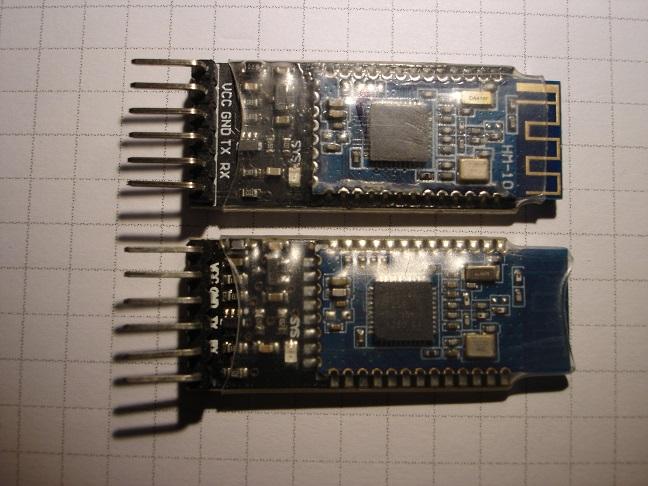
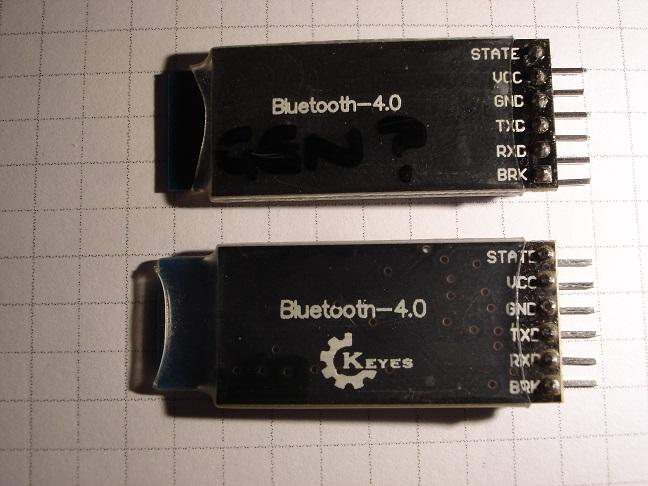
HM10 Modules: I am reasonably certain these where purchased at the same time from the same shop, however it is also possible there are more here that have been mixed in and muddied the water...
Upper module in Pics: HM10 - 1 Possibly genuine? Chip marking - CC2540 AT+VERS? = HMSOFT V610 Most AT commands work
Lower module in Pics: HM10 - 2 Possible fake? Chip marking - CC2541 AT+VERS? = HMSoft V203 Few AT commands work but this is a very early version if VERS? is correct.
Also another couple of "rainy day" ideas: Access to the A2DP "Remote Control" commands send from an BT Audio device so a program can act on them.
The ability to select multiple audio files to play in FM, so far I haven't found a way to do this. (Prompted by Grogsters post)
Once again, these are just food for thought, pretty stoked with what we have already.
Regards, Lyle.
toml_12953 Guru Joined: 13/02/2015 Location: United StatesPosts: 733
Posted: 02:27pm 14 Oct 2026
Copy link to clipboard
Print this post
If you're looking for idas for additions to MMBasic, how about a user-defined coordinate system? This would allow a program to run unchanged no matter what display is used. Example:
WINDOW 0,500,0,500 ' Define X-Axis as 0-500 and Y-Axis as 0-500 as well. PIXEL 250,250,2
will print a dot in the center of the screen no matter what type of display is used.
For a Sine wave you could do this:
WINDOW 0,2*PI,-1,1 ' Domain: 0 to 2*PI, Range: -1 to 1 FOR I=0 to 2*PI STEP .05 PIXEL I,SIN(I),2 NEXT I
Without the WINDOW statement, PIXEL would act just as it does now so older programs would need no change. Edited 2026-10-15 00:41 by toml_12953
terekgabor Senior Member Joined: 02/01/2026 Location: HungaryPosts: 153
Posted: 06:40pm 14 Oct 2026
Copy link to clipboard
Print this post
Hello Peter!
In RC1 when I tried to use OPTION PICO PLUS 2 ON I got Error: Pin GP25 is in use.
Webmite 2350 build with Pimoroni Pico Plus 2.
In PIN LIST GP25 is boot reserved for CYW_43 WL_CS.
Error didn’t come in previous versions.
(Maybe something is related to OPTION CYW43 command?)
G@bor
matherp Guru Joined: 11/12/2012 Location: United KingdomPosts: 12034
Posted: 06:47pm 14 Oct 2026
Copy link to clipboard
Print this post
There was a bug in previous versions GP25 is used for the cyw43 so can't be used for anything else. This was missed previously
terekgabor Senior Member Joined: 02/01/2026 Location: HungaryPosts: 153
Posted: 06:50pm 14 Oct 2026
Copy link to clipboard
Print this post
Thanks! Does it mean OPTION PICO PLUS 2 ON will never work on W version of Pimoroni PP 2? Edited 2026-10-15 05:16 by terekgabor
matherp Guru Joined: 11/12/2012 Location: United KingdomPosts: 12034
Posted: 09:57pm 14 Oct 2026
Copy link to clipboard
Print this post
OPTION PICO PLUS 2 ON
There is no such command - where did you get that from?
I reported a problem in v6.04 of a buffer overrun when a TCP communication timed out. It was fixed in v7.0 Beta1, but I discovered the problem has returned in both beta 8 and RC1.
I have not tested other betas between these. Can you check to make sure the fix is in 7.0 RCx?
Thank you.....Brian
matherp Guru Joined: 11/12/2012 Location: United KingdomPosts: 12034
Posted: 07:47am 16 Oct 2026
Copy link to clipboard
Print this post
Brian
The bug fix is definitely in RC1 and I am unable to reproduce. If you can post a test program that demoes the issue I can look at it further
matherp Guru Joined: 11/12/2012 Location: United KingdomPosts: 12034
New since RC1: The file manager plays a track list: mark audio files with the space bar and press ENTER, step through them with . and , and it shows a cursor at its text prompts
On the Bluetooth host builds BLUETOOTH CONNECT SPEAKER | SERIAL | KEYBOARD says what a device is when its Class of Device does not
OPTION PICO PLUS 2 ON works on the Pimoroni Pico Plus 2 W.
Fixed since RC1 OPTION DISK SAVE omissions PicoMiteRP2040MIN's I2C OLED, structure, tokeniser, MATH, DIM, JSON$ and PRINT #GPS faults PLAY on a directory from another drive, PSRAM part larger than 8 MB, is now safely used as 8 MB.
MM.VER reads 7.000052.
homa Guru Joined: 05/11/2021 Location: GermanyPosts: 715
DIM INTEGER c(4) = (&HFF0000, &HC0392B, &H1F4D2B, &H8A3B1F, &HC9A66B) DIM INTEGER i, k FOR i = 0 TO 4 BOX 100, 100, 40, 40, 0, c(i), c(i) PRINT HEX$(c(i), 6); " read "; HEX$(PIXEL(110, 110), 6); FOR k = 1 TO 4 BLIT READ #1, 100, 100, 20, 20 BLIT WRITE #1, 100, 100 BLIT CLOSE #1 PRINT " > "; HEX$(PIXEL(110, 110), 6); NEXT k PRINT NEXT i
Each 6-bit channel is read back as b5 b5 b4 b3 b2 b1 instead of b5 b4 b3 b2 b1 b0, so every READ/WRITE cycle shifts the channel one more bit. It looks like the read is sampled one bit late.
SPI-LCD.c ReadBufferSPISCR() lines 2051/2067/2086 (also ReadBufferSPI() line 1963): ST7365P is read at SPIReadSpeed (12 MHz). ILI9488/ILI9488P/ST7789B/ILI9481IPS use ST7789RSpeed (6 MHz). Maybe ST7365P needs the slow read too?
Matthias Edited 2026-10-17 07:20 by homa
homa Guru Joined: 05/11/2021 Location: GermanyPosts: 715
Posted: 09:51pm 16 Oct 2026
Copy link to clipboard
Print this post
V7.00.00RC1/RC2 – mounting the SD card also closes open files on A:
Hi Peter,
while testing on V7.00.00RC1 (PC3, OPTION LIST below) I found this: a RANDOM file opened on A: (#7) was closed when a file on B: (#9) was opened afterwards – next SEEK #7 gave Error : File number.
I think the reason is in InitSDCard() (misc/FileIO.c, same in RC2):
for (i = 0; i < MAXOPENFILES; i++) if (FileTable[i].com > MAXCOMPORTS) if (FileTable[i].fptr != NULL) ForceFileClose(i);
FileTable[] is a union of com/fptr/lfsptr, so this also hits LittleFS files on A:. Any (re)mount of B: (first access, or after an SD error) closes open A: files too.
Could InitSDCard()/InitUSBDrive() close only their own files (e.g. check filesource[i] == FATFSFILE)? Side note: this loop runs 0..MAXOPENFILES-1, CloseAllFiles() 1..MAXOPENFILES.
I will catch the error and reopen the file for now.
Regards, Matthias
PicoMitePC3 MMBasic USB RP2350B Edition V7.00.00RC1 OPTION SERIAL CONSOLE COM2,GP8,GP9 OPTION SYSTEM I2C GP20,GP21 OPTION FLASH SIZE 16777216 OPTION COLOURCODE ON OPTION KEYBOARD GR, 0, 1, 200, 75 OPTION HEARTBEAT OFF OPTION PICO OFF OPTION RESOLUTION 640x480 @ 315000KHz OPTION HDMI PINS 1, 3, 5, 7 OPTION WIFI behofam, *****************, Pico3, DE OPTION TELNET CONSOLE ON OPTION SDCARD GP33, GP30, GP31, GP28 OPTION KEYBOARD REPEAT 200,75 OPTION AUDIO I2S GP10,GP22', ON PWM CHANNEL 11 OPTION RTC AUTO ENABLE OPTION COUNT GP34,GP35,GP36,GP37 OPTION COMPILE ON OPTION PLATFORM PICO COMPUTER 3 OPTION PSRAM PIN GP47
Thanks Peter. I loaded RC2 and so far no crashes. It it re-appears I will post here with test code. Thank you.....Brian
matherp Guru Joined: 11/12/2012 Location: United KingdomPosts: 12034
Posted: 07:52am 17 Oct 2026
Copy link to clipboard
Print this post
Mattias On the pixel read issue, try using the ILI9488P driver instead of the ST7365P. We don't really know what display the Picocalc actually uses and in fact different ones may be used in different devices I'll look at the mount issue.
UPDATE: Both issues found and fixed will be in the next release Edited 2026-10-17 18:41 by matherp
Page 3 of 5
Print this page
The Back Shed's forum code is written, and hosted, in Australia.

 Notice. New forum software under development. It's going to miss a few functions and look a bit ugly for a while, but I'm working on it full time now as the old forum was too unstable. Couple days, all good. If you notice any issues, please contact me.


 Print this post