Notice. New forum software under development. It's going to miss a few functions and look a bit ugly for a while, but I'm working on it full time now as the old forum was too unstable. Couple days, all good. If you notice any issues, please contact me.
mozzie Guru Joined: 15/06/2020 Location: AustraliaPosts: 468
Posted: 06:58am 11 Apr 2026
Copy link to clipboard
Print this post
G'day,
Phil / Jim / Robert Many thanks for the suggestions, I have started another thread so as not to clutter up this one.
Peter, Some testing has shown the LCDPANEL USER is not remembered, with: OPTION LCDPANEL USER,800,480 set On a power cycle or reset: OPTION LCDPANEL USER 0,0 is displayed If OPTION LCDPANEL USER,800,480 is put in MM.Startup: LCDPANEL ALREADY CONFIGURED is displayed on startup
Also once it is set up with SUB MM.USER_Rectangle and SUB MM.USER_Bitmap in the library, when returning from the editor: MM.USER_BITMAP not found MM.USER_RECTANGLE not found
Apologies, this is all from memory as I deleted the file with saved text from the PicoMite, this is otherwise the same as shown below.
> option list PicoMite MMBasic RP2040 V6.02.02B1 OPTION SYSTEM SPI GP14,GP15,GP8 OPTION COLOURCODE ON OPTION CPUSPEED (KHz) 200000 OPTION TOUCH GP26,GP27 GUI CALIBRATE 1, 125, 302, 1653, 1305 >
Regards, Lyle.
matherp Guru Joined: 11/12/2012 Location: United KingdomPosts: 12034
Posted: 07:45am 11 Apr 2026
Copy link to clipboard
Print this post
User drivers are temporary. You mustn't do any sort of Option change that "saves" while using a user driver otherwise you get this effect. Do OPTION LCDPANEL DISABLE then configure in the program
mozzie Guru Joined: 15/06/2020 Location: AustraliaPosts: 468
Posted: 02:23pm 11 Apr 2026
Copy link to clipboard
Print this post
G'day Peter, Thanks for the clarification, was trying to use LCDPANEL USER same as LCDPANEL VIRTUAL Regards, Lyle.
PhenixRising Guru Joined: 07/11/2023 Location: United KingdomPosts: 2098
Posted: 05:15pm 11 Apr 2026
Copy link to clipboard
Print this post
VERY much appreciated. Suits my needs perfectly.
matherp Guru Joined: 11/12/2012 Location: United KingdomPosts: 12034
All versions except PicoMiteMin now support the in-built file manager FM. If you use the FM I will be particulalry interested in any actions that cause a crash out to the command prompt. If this happens please try and identify a reproducible pattern that can demonstrate the issue.
# FM Command User Manual
## Overview
The `FM` command opens a full-screen, two-panel file manager for the active storage devices.
It is designed for keyboard-driven workflow on serial terminals, VGA, HDMI, and LCD console modes:
- Browse directories in two panels. - Sort each panel by name, datetime, or type then name. - Launch `.BAS` programs directly. - Open files in the built-in editor. - Copy, rename, delete, and create directories. - Mark multiple items and run batch copy/delete operations. - Play audio files and preview image files. - Keep context between invocations (paths, panel selection, filters, and sort mode).
## Command
```basic FM ```
`FM` takes no arguments.
## Panels And Navigation
Each panel has:
- Current drive and path. - Optional filename filter. - Scrollable file list. - Current selection highlight.
List rows use a leading marker column:
- `*` means the item is marked. - ` ` (space) means unmarked.
The active panel is where file operations are applied.
## Keyboard Shortcuts
FM supports both function keys and Ctrl-key alternatives so it remains usable on keyboards without full function key or paging clusters.
Press `S` to cycle sort mode for the active panel:
- Name - Datetime (newest first) - Type then name
Sort mode is saved in FM context and restored on next launch.
## Type-Select
Press `/` to enter type-select mode.
- Entering type-select forces the active panel to **name sort** first. - Type characters to build a filename prefix match (case-insensitive). - Matching is debounced briefly while typing to reduce redraw churn. - `Backspace` edits the prefix. - `Enter` exits type-select mode and opens the currently selected item. - `Esc` cancels type-select mode.
`F2` or `Ctrl-W` opens the selected file in the editor.
When FM launches a BASIC program and that program throws an error, FM keeps context so returning to FM and opening the same file can position the editor at the reported error location.
## File Operations
- Copy is recursive for directories. - Delete removes files or empty directories. - Rename applies to the selected item. - New directory is created in the active panel path. - `D` duplicates the selected file or directory in the current panel. - `M` moves the selected item to the other panel destination. - `G` prompts for an absolute or relative path and jumps there. - `N` creates an empty file and opens it in the editor. - `X` performs recursive delete for directories (and delete for files) using two separate confirmation prompts. - `/` starts type-select mode so letters can be used as a filename prefix without triggering command keys.
Multi-select behavior:
- If one or more items are marked, `F5`/`Ctrl-Y` copies all marked items. - If one or more items are marked, `DEL`/`Ctrl-]` deletes all marked items (single confirmation). - If one or more items are marked, `X` recursively deletes all marked items (double confirmation). - If no items are marked, operations apply to the currently selected item.
Cross-drive directory copy is supported. Direct cross-drive directory move with `M` is not supported; use copy then delete.
Status messages are shown on the bottom line for operation results and errors.
## Notes For Manual Integration
This section is intended for inclusion in the main PicoMite User Manual under command reference (for example, near `FILES`, `CHDIR`, and editor-related commands). Edited 2026-04-15 04:32 by matherp
terekgabor Senior Member Joined: 02/01/2026 Location: HungaryPosts: 153
Posted: 06:59pm 14 Apr 2026
Copy link to clipboard
Print this post
This file manager is really very useful!!! Only one remark: For smaller LCDs, like Picocalc can be good a line where the whole filename seems. Because for example on Picocalc if you have more files starting with the same word, chars you can’t see which one is which one. But the idea is brilliant! Thank you!
Volhout Guru Joined: 05/03/2018 Location: NetherlandsPosts: 6184
Posted: 07:04pm 14 Apr 2026
Copy link to clipboard
Print this post
@Peter,
mini 2040 beta 3 does not work. Clear flash Install beta 3 type "files" -> crash (restart)
If I use F2 to edit a program then F1 to save it, then F2 again, on the same or different file I get a Stack Overflow crash, same if I do F2 then F2 to get back to FM, then F2.
PS. Ref my previos comment about auto repeat, I've just found if I have a terminal connected auto repeat works, but not if I don't have a terminal. Edited 2026-04-15 20:40 by Bleep
matherp Guru Joined: 11/12/2012 Location: United KingdomPosts: 12034
Posted: 11:27am 15 Apr 2026
Copy link to clipboard
Print this post
This should solve it (HDMIUSB) - I'll post a full update later
Note: autorepeat is deliberately disabled otherwise stacked repeats can cause havoc. This same thing was done on the CMM2 for the same reason Edited 2026-04-15 21:28 by matherp
Peter63 Senior Member Joined: 28/07/2017 Location: SwedenPosts: 217
Posted: 12:15pm 15 Apr 2026
Copy link to clipboard
Print this post
PicoMiteHDMI MMBasic USB RP2350A Edition V6.02.02B4 OPTION SERIAL CONSOLE COM2,GP8,GP9 OPTION SYSTEM I2C GP10,GP11 OPTION FLASH SIZE 4194304 OPTION COLOURCODE ON OPTION MOUSE SENSITIVITY 1.0000 OPTION KEYBOARD US OPTION RESOLUTION 640x480 @ 252000KHz OPTION SDCARD GP5, GP6, GP4, GP3 OPTION RTC AUTO ENABLE
Tested FM and F2 edit, works OK now /Peter63
JanVolk Guru Joined: 28/01/2023 Location: NetherlandsPosts: 420
Posted: 12:43pm 15 Apr 2026
Copy link to clipboard
Print this post
PicoMite MMBasic RP2350A V6.02.02B4 Copyright 2011-2026 Geoff Graham Copyright 2016-2026 Peter Mather
RAM: 0K ( 0%) 0 Variables 0K ( 0%) General 371K (100%) Free > list system i2c HEX 0 1 2 3 4 5 6 7 8 9 A B C D E F 00: [LIBRARY] If MM.Info(SYSTEM I2C)="I2C" Then SYNC check _ad Else I2C check _ad Error : Expression syntax > option list PicoMite MMBasic RP2350A V6.02.02B4 OPTION SYSTEM SPI GP10,GP11,GP12 OPTION SYSTEM I2C GP4,GP5 OPTION FLASH SIZE 16777216 OPTION COLOURCODE ON OPTION HEARTBEAT OFF OPTION PICO OFF OPTION CPUSPEED (KHz) 200000 OPTION DISPLAY 50, 100 OPTION SDCARD GP15 OPTION RTC AUTO ENABLE OPTION F1 help
jan.
matherp Guru Joined: 11/12/2012 Location: United KingdomPosts: 12034
Posted: 12:54pm 15 Apr 2026
Copy link to clipboard
Print this post
Will fix
matherp Guru Joined: 11/12/2012 Location: United KingdomPosts: 12034
Fixes stack overflow issue in FM Fixes LIST SYSTEM I2C and LIST PINS
mozzie Guru Joined: 15/06/2020 Location: AustraliaPosts: 468
Posted: 04:20pm 15 Apr 2026
Copy link to clipboard
Print this post
G'day Peter, File Manager is looking good, a welcome addition now we might have USB mass storage.
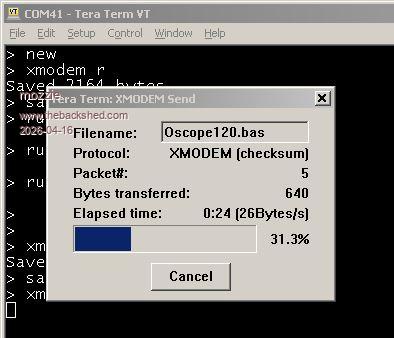
Testing V6.02.02B2/B4 has shown XModem is working to program memory but locking up when saving to A:
> option list PicoMiteHDMI MMBasic USB RP2350A Edition V6.02.02B4 OPTION SERIAL CONSOLE COM2,GP8,GP9 OPTION FLASH SIZE 4194304 OPTION COLOURCODE ON OPTION KEYBOARD US OPTION RESOLUTION 800x480 @ 333000KHz OPTION DISPLAY 40, 100 >
This is working OK in V6.02.02B1 (on another device) with similar options.
> option list PicoMiteHDMI MMBasic USB RP2350A Edition V6.02.02B1 OPTION SERIAL CONSOLE COM2,GP8,GP9 OPTION FLASH SIZE 4194304 OPTION COLOURCODE ON OPTION KEYBOARD US OPTION RESOLUTION 800x480 @ 333000KHz OPTION DISPLAY 40, 100 OPTION HDMI PINS 1, 5, 3, 7 >
Regards, Lyle.
matherp Guru Joined: 11/12/2012 Location: United KingdomPosts: 12034
Posted: 04:28pm 15 Apr 2026
Copy link to clipboard
Print this post
Just worked perfectly for me saving a 72Kb file to the A: drive HDMIUSB version B4
homa Guru Joined: 05/11/2021 Location: GermanyPosts: 715
Posted: 07:40pm 15 Apr 2026
Copy link to clipboard
Print this post
Lyle, check your version of Tera Term! I also had to upgrade from an older version to 5.2 (I think 5.6 is the latest) to sort out some Xmodem issues. Matthias
Peter63 Senior Member Joined: 28/07/2017 Location: SwedenPosts: 217
Posted: 08:06pm 15 Apr 2026
Copy link to clipboard
Print this post
i tested XMODEM r and XMODEM r "test.bas" , works OK , using Tera Term V5.3 x86
tested list system i2c = OK tested list pins = OK
/Peter63
Page 4 of 8
Print this page
The Back Shed's forum code is written, and hosted, in Australia.

 Notice. New forum software under development. It's going to miss a few functions and look a bit ugly for a while, but I'm working on it full time now as the old forum was too unstable. Couple days, all good. If you notice any issues, please contact me.


 Print this post