Notice. New forum software under development. It's going to miss a few functions and look a bit ugly for a while, but I'm working on it full time now as the old forum was too unstable. Couple days, all good. If you notice any issues, please contact me.
twofingers Guru Joined: 02/06/2014 Location: GermanyPosts: 1782
Posted: 06:14pm 04 Oct 2026
Copy link to clipboard
Print this post
@Peter I suspect I’ve chosen the wrong moment again. Nevertheless: You might want to consider whether it would be useful to implement an enhanced version of the "Copy" command (similar to the DOS XCOPY command) as an option in the current firmware version - one that adopts the source file's date and time rather than the current system date. This would be useful for backup purposes and makes even more sense when no RTC is available. I’ve implemented this in FM (javavis) in a somewhat roundabout way - albeit successfully - but it would be more elegant as a native BASIC command. Regards Michael
homa Guru Joined: 05/11/2021 Location: GermanyPosts: 715
Posted: 07:03pm 04 Oct 2026
Copy link to clipboard
Print this post
deleted - It seems I must have entered it incorrectly! Edited 2026-10-05 05:05 by homa
PhenixRising Guru Joined: 07/11/2023 Location: United KingdomPosts: 2097
Posted: 07:07pm 04 Oct 2026
Copy link to clipboard
Print this post
I respectfully request a time-machine built-in to V8. Go back 30 years and I might be able to catch TF up
b5 working great. Modest speed increase but I'm already overkill....this stuff is too darned good
terekgabor Senior Member Joined: 02/01/2026 Location: HungaryPosts: 153
Posted: 08:19pm 04 Oct 2026
Copy link to clipboard
Print this post
B5 is working well for me. Impressive speed up with b4,b5! Thanks Peter
I will test it more.
G@bor
toml_12953 Guru Joined: 13/02/2015 Location: United StatesPosts: 733
Posted: 03:18am 05 Oct 2026
Copy link to clipboard
Print this post
I was having a problem compiling the source but when I re-downloaded and tried again, it worked.
I love this firmware! Edited 2026-10-05 14:01 by toml_12953
matherp Guru Joined: 11/12/2012 Location: United KingdomPosts: 12034
Posted: 09:15am 05 Oct 2026
Copy link to clipboard
Print this post
I'm on diminishing returns as far as coverage of the compiler is now concerned so the next phase is to try and optimise further what is there. The compiler generates code that runs through a virtual machine and this machine by definition introduces significant overheads compared to real compiled C. So the next phase is to try and reduce that overhead. In the meantime don't forget the mmb2csub python script. This takes your MMBasic and converts it directly into a csub using the gcc compiler with no overhead and in the case of the TSCP chess program runs 47 times faster than the compiler and well over 100 times faster than normal interpreted code (210x faster on the rp2040)
matherp Guru Joined: 11/12/2012 Location: United KingdomPosts: 12034
TassyJim Guru Joined: 07/08/2011 Location: AustraliaPosts: 6624
Posted: 07:23am 06 Oct 2026
Copy link to clipboard
Print this post
Testing WiFi with PicoMiteHDMIWEB MMBasic USB RP2350B Edition V7.0.00b6 Connections to my FritzBox works reliably but it has been reliable for a few versions . Is there any indication when the failure happens?
I forget when the "every second connection fail" problem went away for me.
PhenixRising Guru Joined: 07/11/2023 Location: United KingdomPosts: 2097
Posted: 09:10am 06 Oct 2026
Copy link to clipboard
Print this post
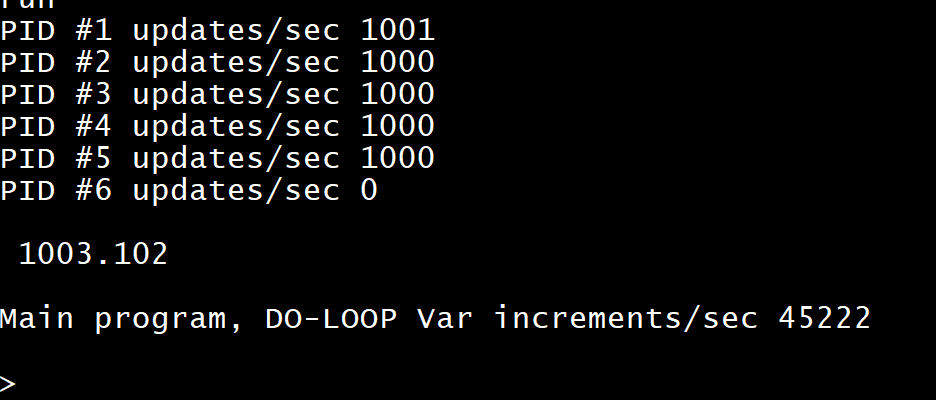
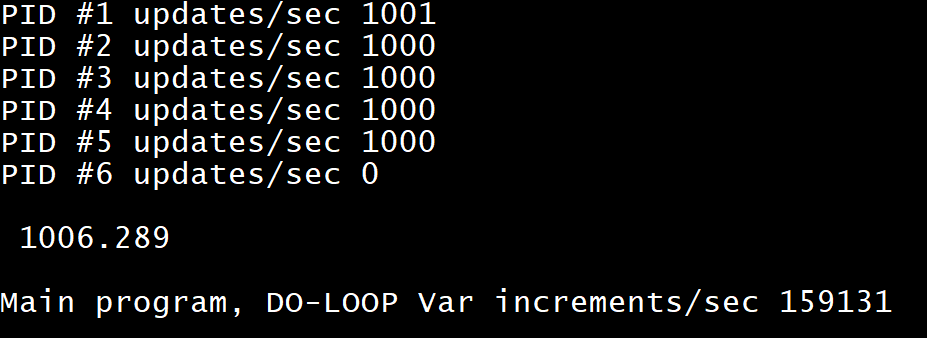
Is this even possible?
B5
B6
PhenixRising Guru Joined: 07/11/2023 Location: United KingdomPosts: 2097
Posted: 10:23am 06 Oct 2026
Copy link to clipboard
Print this post
Pete, this code runs faster with OPTION COMPILE OFF
dim integer blks,param1,param2 dim string SequenceTable(28) blks=50 dim float dbb(blks),pob(blks),dob(blks) SequenceTable(0)="FollowerExtend" SequenceTable(1)="FollowerRetract" SequenceTable(2)="IsFollowerRetracted" SequenceTable(3)="MandrelExtend" SequenceTable(4)="IsMandrelExtended" SequenceTable(5)="MandrelRetract" SequenceTable(6)="ColletClose" SequenceTable(7)="IsColletClosed" SequenceTable(8)="ColletOpen" SequenceTable(9)="IsColletOpen" SequenceTable(10)="ClampPdieClose" SequenceTable(11)="IsClampPdieClosed" SequenceTable(12)="ClampPdieOpen" SequenceTable(13)="IsClampPdieOpen" SequenceTable(14)="ClampOpen" SequenceTable(15)="IsClampOpen" SequenceTable(16)="ClampClose" SequenceTable(17)="IsClampClosed" SequenceTable(18)="PdieOpen" SequenceTable(19)="IsPdieOpen" SequenceTable(20)="PdieClose" SequenceTable(21)="IsPdieClosed" SequenceTable(22)="PdieShort" SequenceTable(23)="IsPdieShort" SequenceTable(24)="IsSeqStartSignal" SequenceTable(25)="BendDieReturn" SequenceTable(26)="BendDieReturnOff" SequenceTable(27)="HighPressure" SequenceTable(28)="HighPressureOff" param1=3 param2=1000 timer=0 for i=0 to 28 Call SequenceTable(i),param1,param2 next fin=timer print fin,"Done" print param1,param2 sub FollowerExtend(a as integer,b as integer) inc a end sub sub FollowerRetract(a as integer,b as integer) end sub sub IsFollowerRetracted(a as integer,b as integer) end sub sub MandrelExtend(a as integer,b as integer) end sub sub IsMandrelExtended(a as integer,b as integer) end sub sub MandrelRetract(a as integer,b as integer) end sub sub IsMandrelRetracted(a as integer,b as integer) end sub sub ColletClose(a as integer,b as integer) end sub sub IsColletClosed(a as integer,b as integer) end sub sub ColletOpen(a as integer,b as integer) end sub sub IsColletOpen(a as integer,b as integer) end sub sub ClampPdieClose(a as integer,b as integer) end sub sub IsClampPdieClosed(a as integer,b as integer) end sub sub ClampPdieOpen(a as integer,b as integer) end sub sub IsClampPdieOpen(a as integer,b as integer) end sub sub ClampOpen(a as integer,b as integer) end sub sub IsClampOpen(a as integer,b as integer) end sub sub ClampClose(a as integer,b as integer) end sub sub IsClampClosed(a as integer,b as integer) end sub sub PdieOpen(a as integer,b as integer) end sub sub IsPdieOpen(a as integer,b as integer) end sub sub PdieClose(a as integer,b as integer) end sub sub IsPdieClosed(a as integer,b as integer) end sub sub PdieShort(a as integer,b as integer) end sub sub IsPdieShort(a as integer,b as integer) end sub sub IsSeqStartSignal(a as integer,b as integer) end sub sub BendDieReturn(a as integer,b as integer) end sub sub BendDieReturnOff(a as integer,b as integer) end sub sub HighPressure(a as integer,b as integer) end sub sub HighPressureOff(a as integer,b as integer) end sub
PhenixRising Guru Joined: 07/11/2023 Location: United KingdomPosts: 2097
Posted: 03:12pm 06 Oct 2026
Copy link to clipboard
Print this post
Hmm, incorporated some functional code and OPTION COMPILE ON performance goes through the roof again
Have to say that this procedure pointer stuff is the dog's bollox for efficiency.
Geeked again
toml_12953 Guru Joined: 13/02/2015 Location: United StatesPosts: 733
Posted: 03:35pm 06 Oct 2026
Copy link to clipboard
Print this post
When I try to compile for PicoCalc with Pimoroni Pico 2, I get this:
/usr/lib/gcc/arm-none-eabi/14.2.1/../../../arm-none-eabi/bin/ld: PicoMite.elf section `.heap' will not fit in region `RAM' /usr/lib/gcc/arm-none-eabi/14.2.1/../../../arm-none-eabi/bin/ld: region `RAM' overflowed by 188 bytes collect2: error: ld returned 1 exit status make[2]: *** [CMakeFiles/PicoMite.dir/build.make:2414: PicoMite.elf] Error 1 make[1]: *** [CMakeFiles/Makefile2:2423: CMakeFiles/PicoMite.dir/all] Error 2 make: *** [Makefile:91: all] Error 2
Footnote added 2026-10-09 15:39 by toml_12953 Solved. The problem was that I was using an old command from madcock. His PICO SDK install script was as follows
mkdir -p ~/pico && cd ~/pico git clone https://github.com/raspberrypi/pico-sdk.git cd pico-sdk git checkout tags/2.2.0 -b sdk2.2.0 git submodule update --init
The 4th line must be eliminated to use the latest PICO SDK. The 2.2.0 version doesn't work. Once that line was removed, everything compiled fine.
matherp Guru Joined: 11/12/2012 Location: United KingdomPosts: 12034
Posted: 03:50pm 06 Oct 2026
Copy link to clipboard
Print this post
Sorry, but I don't and can't support anyone building the code themselves. Clearly it builds for me and there is no way I can know what is different in your environment
terekgabor Senior Member Joined: 02/01/2026 Location: HungaryPosts: 153
Posted: 03:52pm 06 Oct 2026
Copy link to clipboard
Print this post
I will build in the evening, then feed back!
G@bor
Bleep Guru Joined: 09/01/2022 Location: United KingdomPosts: 863
Posted: 04:10pm 06 Oct 2026
Copy link to clipboard
Print this post
Hi Peter, Did the compiler optimisation change get into b6? I just re converted two programs using the latest scripts and they are byte identical, I realise this could be correct, the new optimisation hasn't affected these two programs, but just checking. Regards Kevin.
matherp Guru Joined: 11/12/2012 Location: United KingdomPosts: 12034
Posted: 04:25pm 06 Oct 2026
Copy link to clipboard
Print this post
You have to specify the optimisation in the mmb2csub command line See mmb2csub.pdf in the zip of additional documents in the release
toml_12953 Guru Joined: 13/02/2015 Location: United StatesPosts: 733
Posted: 05:35pm 06 Oct 2026
Copy link to clipboard
Print this post
To get the same setup as me, put these in CMakeLists.txt:
set(PICOCALC TRUE)
and
set(COMPILE PICORP2350)
To compile under Linux, change all 3 occurrences of
.obj
to
.o
in
cmake/relocate_gpio_irq_to_ram.cmake Edited 2026-10-07 03:40 by toml_12953
terekgabor Senior Member Joined: 02/01/2026 Location: HungaryPosts: 153
Posted: 05:38pm 06 Oct 2026
Copy link to clipboard
Print this post
Building b6 went ok. I tried some new devs in my Webmite version: PLED ON/OFF/TOGGLE : switch LED on Pico board (controlled by CYW43) on/off or toggle status. These are working only if OPTION HEARTBEAT OFF, anyway got an error. MM.INFO(PLED): status of this LED (0-off, 1-on, working if HEARTBEAT ON also).
I will test compiler functions also. Thanks Peter again for this very good compiler!
G@bor
matherp Guru Joined: 11/12/2012 Location: United KingdomPosts: 12034
New in beta 7: Bluetooth speakers and headphones, and the PicoMiteHDMIBTH
# Using a Bluetooth speaker
You can now play sound through a Bluetooth speaker or headphones. Everything that PLAY does works through the speaker, and your Bluetooth keyboard and mouse carry on working at the same time.
## Setting it up
Do this once:
OPTION AUDIO BLUETOOTH
The PicoMite restarts. Then switch the speaker on, put it into pairing mode, and search for it:
> BLUETOOTH SCAN Scanning... 41:42:A3:1C:07:5E -58 dBm Audio "BT Speaker" 1 device found
Connect to it using the name that the scan showed:
BLUETOOTH CONNECT "BT Speaker"
That's all. Now try it:
PLAY TONE 440, 440, 1000
## After that
The PicoMite remembers your speaker. When you next switch it on, the speaker reconnects by itself, so you never need BLUETOOTH CONNECT again.
## Useful commands
BLUETOOTH STATUS shows what is connected BLUETOOTH DISCONNECT disconnects the speaker BLUETOOTH CONNECT "name" connects to a different speaker (it replaces the old one) BLUETOOTH FORGET forgets all paired devices, if pairing gets stuck
In a program, MM.INFO$(BLUETOOTH SPEAKER) returns the speaker's address. It returns "" if no speaker is connected.
## Speaker going to sleep?
After 60 seconds of silence the PicoMite stops sending to the speaker, so the speaker can turn itself off. The next sound starts things up again, but it starts a moment late. You can change the time, in seconds:
OPTION AUDIO BLUETOOTH 10
To keep the speaker connection running all the time, use 0:
OPTION AUDIO BLUETOOTH 0
The PicoMiteRP2350BTH can now play through a Bluetooth speaker or headphones as well as take a Bluetooth keyboard. The manual covers it under Sound Output (Bluetooth Speakers and Headphones) and in the Bluetooth Versions chapter (PicoMiteBTH - Bluetooth Speakers and Headphones).
A new build: PicoMiteHDMIBTH. This is the PicoMiteHDMIUSB (HDMI display and USB host) with the PicoMiteRP2350BTH's Bluetooth added: Bluetooth LE keyboards and mice and Bluetooth speakers, with everything below. Like the PicoMiteHDMIWEB it needs an RP2350 board with the Raspberry Pi wireless chip (a Pico 2 W or similar). It takes programs of up to 180 KB and has a 228 KB heap. The manual does not name it yet: what it says about Bluetooth on the PicoMiteRP2350BTH applies to the PicoMiteHDMIBTH, and what it says about the display and USB on the PicoMiteHDMIUSB applies too.
OPTION AUDIO BLUETOOTH [idle] makes Bluetooth the board's audio output. Everything PLAY does (tones, PLAY SOUND, WAV, FLAC, MP3 and MOD files) goes to the speaker. With no speaker connected the sound is thrown away at the speed it would have played, so a program runs as it does with a wired output and nothing plugged in. idle (0 to 250 seconds, default 60) is how long the stream to the speaker stays open after the last sound. After that the next sound waits about half a second while it opens again. 0 keeps it open for as long as a speaker is connected. BLUETOOTH SCAN lists the devices in range, BLUETOOTH CONNECT name$ pairs with one and connects to it by the name the scan showed (in any case) or by its address, BLUETOOTH DISCONNECT lets it go and BLUETOOTH STATUS reports the connection. The board remembers the last speaker it played through. With OPTION AUDIO BLUETOOTH set it connects to it again by itself a few seconds after a reset, and whenever it comes back in range, until BLUETOOTH DISCONNECT. BLUETOOTH FORGET deletes every stored pairing, keyboards and speakers; BLUETOOTH FORGET addr$ deletes one device's. MM.INFO$(BLUETOOTH SPEAKER) and MM.INFO$(BLUETOOTH KEYBOARD) give the connected device's address, or an empty string. Encoding the sound for the speaker takes 12 to 14% of the processor at 200 MHz while the stream is open.
Bluetooth keyboards also do better on both builds. A paired keyboard connects again after a reset with a key press, without its pairing button, and when it wakes up it uses its pairing instead of pairing afresh each time. A keyboard that asks for a passkey when it pairs could not pair before; the board now shows the six-digit code on the console to be typed on the keyboard, which should let it pair. We have not had such a keyboard to try, so please tell us how it goes if you have one.
What the Bluetooth builds give up. To make room the PicoMiteRP2350BTH no longer has PWM audio (OPTION AUDIO pin, pin), the SPI DAC (OPTION AUDIO SPI) or the VS1053 (OPTION AUDIO VS1053 and the PLAY commands that need it, such as PLAY MIDI and PLAY STREAM), and the PicoMiteHDMIBTH has none of them either. Their audio outputs are I2S and Bluetooth. A PWM or SPI audio option set by an earlier firmware is ignored: set OPTION AUDIO I2S or OPTION AUDIO BLUETOOTH instead. The PicoMiteRP2350BTH's heap is 324 KB, 12 KB less than in beta 6; its program size and flash layout do not change. Edited 2026-10-07 04:30 by matherp
PhenixRising Guru Joined: 07/11/2023 Location: United KingdomPosts: 2097
Posted: 06:52pm 06 Oct 2026
Copy link to clipboard
Print this post
Beyond insane 🤣😂
No doubt anymore; matherp is definitely reading my mind. Granted, it's not much of a read 🤣😂
Page 4 of 6
Print this page
The Back Shed's forum code is written, and hosted, in Australia.

 Notice. New forum software under development. It's going to miss a few functions and look a bit ugly for a while, but I'm working on it full time now as the old forum was too unstable. Couple days, all good. If you notice any issues, please contact me.


 Print this post