Notice. New forum software under development. It's going to miss a few functions and look a bit ugly for a while, but I'm working on it full time now as the old forum was too unstable. Couple days, all good. If you notice any issues, please contact me.
terekgabor Senior Member Joined: 02/01/2026 Location: HungaryPosts: 153
Posted: 06:55pm 06 Oct 2026
Copy link to clipboard
Print this post
Wow!
That is fantastic development!
toml_12953 Guru Joined: 13/02/2015 Location: United StatesPosts: 733
Posted: 10:53pm 06 Oct 2026
Copy link to clipboard
Print this post
I'm using PicoMiteRP2350V7.0.00b7 on a PicoCalc. When I plug or unplug the USB cable to the serial port while the PicoCalc is on, it shuts off. Also, the PC can't see the PicoCalc on a serial port when I start it with the USB cable plugged in. I had neither of these problems in B5.
Footnote added 2026-10-07 08:54 by toml_12953 A different USB cable solved these issues. Sorry!
gadgetjack Senior Member Joined: 15/07/2016 Location: United StatesPosts: 240
Posted: 12:51am 07 Oct 2026
Copy link to clipboard
Print this post
I tried picomite V7.0.00b5 on a rp2350b core module with vga output and psram. It works but comes up with a scrambled screen. If I switch to mode 2 or 3 it is fine. I can sometimes switch to mode 1 and it will work but not always. All the new functions are ok , games play ok, file manager is ok. Just a glitch with mode 1. Not sure what to make of this. Jack
mozzie Guru Joined: 15/06/2020 Location: AustraliaPosts: 468
Posted: 07:05am 07 Oct 2026
Copy link to clipboard
Print this post
G'day, Peter, simply amazing... loading 7.00.00b7 onto a HDMIUSB board and being able to have simultaneous terminal / bluetooth / USB keyboards connected and HDMI output with Bluetooth audio from USB or SDCard at the same time... on what I basically still consider a $12AUD Micro-Controller, incredible.
The Bluetooth keyboard issue reported in the 6.04.00 betas is no longer a problem and the diagnostics are a great help.
My thanks to you and your AI genie once again
Also thanks to Andrew_G, my spanking new PC3 with WIFI and PSRAM arrived this arvo and is already getting a workout.
Bluetooth audio is a bit hit and miss, probably to be expected at this early stage (and with Bluetooth):
1. Generic Bluetooth reciever (only) works perfectly every time. 2. Milwaukee M12 Bluetooth speaker connects but no audio is passed through. 3. Generic Bluetooth TX/RX unit will not connect (Error 0x66 / Error 0x69 / Error 0x6A) 4. Bluetooth car stereo (AXIS AX1801BT) works but briefly drops audio approx every 5secs. (This was with a ST7796S LCD, will re-test with HDMI shortly)
Units 2,3,4 are all able to send audio back to the source, perhaps this is a problem.
Also on PC1 (HDMIUSB) with Pico2W mounted, and PC3 with WIFI and PSRAM, only the default 640x480@315000 appears to work correctly, 1024x600 and 640x480@252000 both try to work but are very slow from the terminal, drop the USB keyboard or hub and the heartbeat LED slows down or stops at random.
Resetting to 640x480@315000 brings everything back to normal.
Phenix, If you think thats scary, at least you're in the same country, I reckon he's reading mine from 16000km* away, a short read also Maybe Claude is spying on us, in that case where's that foil hat....
(* 16000ish by surface, 9500ish if the signal went straight through)
Regards, Lyle.
Bryan1 Guru Joined: 22/02/2006 Location: AustraliaPosts: 2297
Posted: 07:45am 07 Oct 2026
Copy link to clipboard
Print this post
Well first job in the morning is going to be flashing this b7 onto a PC3 board so I can finally get my K250 keyboard and M196 mouse working and see how easy it is to get my flip 6 BT speaker going.
Spent most of the day with my PC3 mounted on the back of my 10.1" LCD trying to get the GPS working and around 4pm finally got it working So while going for a drive tomorrow I can check the speed against my dashcam and see if there is a difference.
Now this is on my micro-pyhon build where USB: Touch just has worked from go on this LCD so it will be interesting to see if it will in mmbasic.
Regards Bryan
matherp Guru Joined: 11/12/2012 Location: United KingdomPosts: 12034
Posted: 09:26am 07 Oct 2026
Copy link to clipboard
Print this post
Lyle
Please try the attached which includes all three bluetooth builds. This addresses some possible issues with your bluetooth devices and changes the way bluetooth is handled which should sort out the performance issues.
Problem: the packet header can only count up to 15 frames, but packets were filled to whatever size the speaker allowed. With some speakers the count overflowed and every packet arrived corrupt, so it connected but played nothing. A packet could also come out one byte too big and be silently refused. Should allow: speakers like the Milwaukee M12 to play, if that was its problem.
2. Shorter encryption keys accepted
Problem: btstack insisted on the longest encryption key. A device that agrees a shorter one paired, but the audio channel was then refused with Bluetooth error 0x66. Should allow: the TX/RX unit to connect. It still needs to be in receive (RX) mode.
3. Mono offered
Problem: only stereo was offered. A speaker that supports nothing but mono was set up as stereo, which it can't play. Should allow: mono-only speakers to play, with left and right mixed together. Unchanged: stereo speakers still get stereo.
4. Sound quality steps down when the link can't keep up
Problem: the stream always ran at full quality. On a weak or busy link the backlog grew until sound was thrown away, giving a short gap every few seconds. Now: the quality steps down automatically until the link keeps up, and creeps back up once things are calm. Should allow: the car stereo to play without dropouts, if its link was the cause.
5. More information from BLUETOOTH STATUS
The speaker's packet size limit (MTU) and the frames sent per packet. Packets that were refused. The quality level in use, and how often it was lowered. How many times the stream started and paused, and how many of the pauses the speaker caused. Should allow: you to tell from one STATUS listing which of the above is behind a problem. If a speaker keeps pausing the stream itself, it will show up in the pause count. Edited 2026-10-07 23:18 by matherp
mozzie Guru Joined: 15/06/2020 Location: AustraliaPosts: 468
Posted: 01:49pm 07 Oct 2026
Copy link to clipboard
Print this post
G'day Peter, Thanks for the response, mostly good news: Generic TX/RX now working correctly (both builds) Milwaukee M12 will work but only if file is playing when unit connects, and is fine from then. Will not play if connected before file is started with either Play Tone or MP3 / WAV. (both builds)
I will test the car stereo in the morning, definitely past my bed time
This is from the Milwaukee M12 Radio when working:
> bluetooth status Bluetooth: on Keyboard: not connected Speaker: 48:B5:A7:60:F1:91, streaming Stream: SBC 48000 Hz, joint stereo, bitpool 51 (of 53), 16 blocks, 8 subbands, MTU 716 Encoder: 15.5% of CPU, 7742 packets of 6 frames in 115 s Underruns: 0 Longest encoder gap: 7 ms Longest send wait: 61 ms, samples dropped: 0, send errors: 0 Stream starts: 0, pauses: 0 (0 by the speaker), closed by the speaker: 0 Bitpool lowered: 2 times, lowest 43 Bond store: 0 writes, longest 0 ms, total 0 ms Keyboard security: 0 pairings, 1 re-encryptions since boot Keyboard bonds held: 1 Last pairing: none since boot >
Will post more diagnostic data in the morning as well if required.
Regards, Lyle.
matherp Guru Joined: 11/12/2012 Location: United KingdomPosts: 12034
Posted: 01:51pm 07 Oct 2026
Copy link to clipboard
Print this post
Lyle Can you confirm the timestamp of the file you loaded to test. I did replace them in my post quite recently
mozzie Guru Joined: 15/06/2020 Location: AustraliaPosts: 468
Posted: 02:04pm 07 Oct 2026
Copy link to clipboard
Print this post
Hi Peter,
ZIP File is: 2026-10-07_192322_PicoMiteRP2350BTHV7.0.00b7.zip
Also tried 1024x600 resolution but console is still sluggish and USB HUB non-functional, not sure if you have had a chance to look at this aspect yet.
Regards, Lyle.
matherp Guru Joined: 11/12/2012 Location: United KingdomPosts: 12034
Posted: 02:05pm 07 Oct 2026
Copy link to clipboard
Print this post
Re-download again and retry. The performance should be better. Timestamp should be c14:16 Edited 2026-10-08 00:06 by matherp
mozzie Guru Joined: 15/06/2020 Location: AustraliaPosts: 468
Posted: 02:57pm 07 Oct 2026
Copy link to clipboard
Print this post
Hi Peter, OK, Good news, with latest version 1024x600@252000 and 640x480@252000 are both working from console and USB keyboard with Bluetooth as well.
Milwaukee M12 speaker requires audio to be playing when connecting, I wonder if the unit itself goes into a standby state. It works every time if the file on the PicoMite is playing when it connects or I change modes. I'll try it from another source to confirm.
I will test the car stereo and anything else I can find tomorrow. off to bed
Thanks again.
Regards, Lyle.
matherp Guru Joined: 11/12/2012 Location: United KingdomPosts: 12034
Posted: 03:12pm 07 Oct 2026
Copy link to clipboard
Print this post
Lyle the report makes sense. The difference between working and failing comes down to when the stream gets started:
Plays: if something is playing when the M12 connects, the PicoMite starts the stream straight away. Silent: if it connects while nothing is playing, the stream is set up but not started, because of the default OPTION AUDIO BLUETOOTH 60. It's only started when PLAY begins, which may be minutes later. So the M12 accepts a stream that starts immediately but not one that starts later. On our side, the likeliest cause is a gap in the code.
The likely problem: the speaker closes the idle stream and we never reopen it.
Some speakers close a stream that has been set up but not started for a while, while keeping the connection itself. btstack reports that as a stream release. Our release handler (BTAudio.c:641) stops the timer and counts it, but leaves our state at "open". Nothing re-establishes the stream. When PLAY starts, bt_audio_service asks btstack to start the stream. The media channel has gone, so btstack refuses at once (avdtp_start_stream: no media connection). bt_audio_service then falls through to throwing the sound away in real time, and does so on every pass, for as long as the speaker stays connected. That fits "won't play at all" exactly. Two other possibilities:
The M12 refuses or ignores a late start. We don't watch for btstack's "command rejected" event. And if a start request is never answered, btstack's pending-start flag stays set and every later start is refused. The stream does run, but the M12 doesn't play it. For example, it may have switched itself to another source after sitting idle. Nothing in our code could change that, short of AVRCP. What would settle it: one BLUETOOTH STATUS taken while the M12 is failing (PLAY running, no sound). The counters reset at each STATUS, so it should be the first one after the failure.
STATUS shows Meaning idle and closed by the speaker: 1 It closed the stream and we never reopened it (the likely case) idle, Stream starts: 0, closed 0 It refused or ignored the start request streaming, packet count rising, no send errors The audio reaches it, and the M12 itself stays silent A second test would also help: start a file so the M12 plays, then leave it silent for over 60 seconds so we pause the stream, then PLAY again. If it plays, only the first late start fails, which points to the close.
A workaround the tester can try now: OPTION AUDIO BLUETOOTH 0. The stream then starts as soon as the speaker connects and is never paused, which recreates the case that works. The cost is that the encoder runs all the time, about 15% of the CPU at the M12's 48 kHz.
The rest of the working-case STATUS looks healthy:
48 kHz: the M12 runs at 48 kHz even though we prefer 44.1. Either it supports only 48 kHz, or it opened the connection itself and chose 48 kHz. Both are handled. Bitpool: it dropped twice, to 43 at lowest, and recovered to 51. With a longest send wait of 61 ms the link is a little marginal, and the adaptation is doing its job. No losses: no dropped samples, underruns or send errors.
JanVolk Guru Joined: 28/01/2023 Location: NetherlandsPosts: 420
Posted: 07:39pm 07 Oct 2026
Copy link to clipboard
Print this post
I started working with the `help.txt` file on a bare PicoMite and now understand why I had issues with XMODEM in the past. The problem was that I hadn't entered the exact filename, causing it to fail or resulting in a file size of zero. Also, the files were somewhat buried within MMEdit and Notepad++, so I came up with a better solution. Copy `help.txt` to your desktop, rename it to something simple and easy to type (avoiding the name `help.txt`), and open/save it using Notepad. You can now try reading and editing the file in Notepad (which comes standard with Windows) and save your changes there. At the top of the file—but below the `~help` tag—add the filename, program version, and date. e.g., `helpEng V7.00.00b7 07-10-2026` You can edit the entire file, but make sure no line exceeds 79 characters. You can also shorten lines where appropriate and indent examples with a tab at the start of the line. The parameter tables aren't perfectly aligned either, but that isn't really a priority. Save the file in Notepad. Now, connect to the module using Tera Term. Type `xmodem r "helpEng"` at the `>` prompt and press Enter. You then have one minute to locate the correct file using Tera Term. In Tera Term: File -> Transfer -> XMODEM -> Send (left mouse button) Select the Desktop, click on `helpEng`, and the transfer will start immediately at 30k baud, indicated by a green progress bar. Once finished, type `files` in Tera Term and press Enter. Type `copy "help.Eng" to "help.txt"` and press Enter; it is now ready to use.
> help help helpEng V7.00.00b7 07-10-2026 MMBasic online help. Type HELP followed by a command, function, option or variable name - quotes are not needed: HELP PRINT HELP MATH FFT HELP MM.INFO(OPTION) The name must match a topic exactly, so use the wildcards to explore: HELP MATH* every topic whose name starts with MATH HELP *SPRITE* every topic with SPRITE anywhere in the name HELP??? every three-character name Nothing is printed when no topic matches - try a wildcard. Long entries pause with PRESS ANY KEY. Indexes of every topic in this file: HELP COMMANDS HELP FUNCTIONS HELP OPTIONS HELP VARIABLES HELP OBSOLETE This file is generated from the PicoMite User Manual, which carries the full description of every entry along with the tutorial chapters.
Jan.
Bryan1 Guru Joined: 22/02/2006 Location: AustraliaPosts: 2297
Posted: 11:07pm 07 Oct 2026
Copy link to clipboard
Print this post
Ok so today's fun has started
flashed the last uf.2 posted and the first thing I do with a new flash
So no outside connection with this build, now the Logitech K250 keyboard said it paired on the first try but no key strokes from the K250 registered. Now what was interesting when I went to pair the M196 mouse the keyboard disconnected where any key stroke on the K250 went a new 6n pairing on the screen.
Did a reboot then a Bluetooth scan where 0 was found put the K250 back in pairing mode and 5 6n keys were shown also any keypress on the K250 results in a new 6n.
So more fun ahead....
Regards Bryan
Bryan1 Guru Joined: 22/02/2006 Location: AustraliaPosts: 2297
Posted: 12:19am 08 Oct 2026
Copy link to clipboard
Print this post
Ok with the flip 6 did a fresh pairing opened fm and now got the Stones playing so BT audio with my Flip 6 works off the bat with none of those interruptions I found when trying in micro-python.
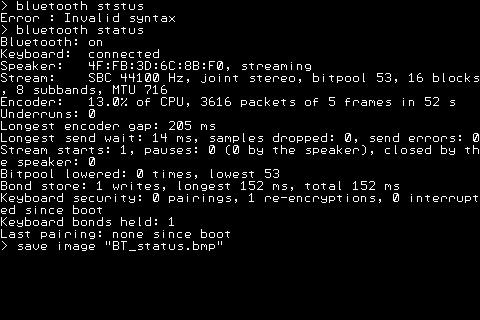
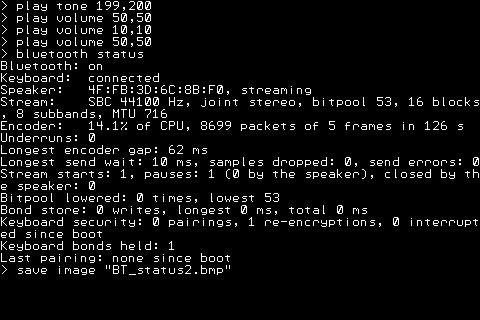
> bluetooth status Bluetooth: on Keyboard: connected Speaker: 90:F2:60:76:BE:F0, streaming Stream: SBC 44100 Hz, joint stereo, bitpool 40, 16 blocks, 8 subbands, MTU 672 Encoder: 10.6% of CPU, 10255 packets of 7 frames in 208 s Underruns: 0 Longest encoder gap: 97 ms Longest send wait: 25 ms, samples dropped: 0, send errors: 0 Stream starts: 1, pauses: 0 (0 by the speaker), closed by the speaker: 0 Bitpool lowered: 0 times, lowest 40 Bond store: 2 writes, longest 166 ms, total 332 ms Keyboard security: 8 pairings, 2 re-encryptions, 0 interrupted since boot Keyboard bonds held: 4 Last pairing: C0:F3:52:F5:73:79 (random), bond stored
Now to try and sort out the K250 keyboard I have taken the battery out yet the firmware still says it has a pairing.
> bluetooth status Bluetooth: on Keyboard: connected Speaker: 90:F2:60:76:BE:F0, idle Stream: SBC 44100 Hz, joint stereo, bitpool 40, 16 blocks, 8 subbands, MTU 672 Underruns: 0 Longest encoder gap: 23 ms Longest send wait: 16 ms, samples dropped: 0, send errors: 0 Stream starts: 0, pauses: 1 (0 by the speaker), closed by the speaker: 0 Bitpool lowered: 0 times, lowest 40 Bond store: 0 writes, longest 0 ms, total 0 ms Keyboard security: 8 pairings, 2 re-encryptions, 0 interrupted since boot Keyboard bonds held: 4 Last pairing: C0:F3:52:F5:73:79 (random), bond stored
Doing a reboot
PicoMiteHDMIBTH MMBasic USB RP2350B Edition V7.0.00b7ed Copyright 2011-2026 Geoff Graham Copyright 2016-2026 Peter Mather
Total of 6 Mbytes PSRAM available > US USB Keyboard Connected on channel 1 > USB Mouse Connected on channel 2 > Bluetooth Keyboard Connected > USB Flash Drive Connected (addr 2) > Bluetooth speaker connected >
So with the K250 unpowered why is it still showing as connected.
I do have computer B setup with TeraTerm now so I'm running the board from that so I can copy/paste the output.
Bryan1 Guru Joined: 22/02/2006 Location: AustraliaPosts: 2297
Posted: 03:07am 08 Oct 2026
Copy link to clipboard
Print this post
Ok this one is Peter and the morning report with Claudes reply
**V7.0.00b7 HDMIBTH on Pico Computer 3: Bluetooth keyboard and mouse results**
First, thank you for adding Bluetooth. The JBL Flip 6 works perfectly: `BLUETOOTH SCAN`, `BLUETOOTH CONNECT`, then MP3 playback through the speaker.
Two problems with standard retail Bluetooth devices (Logitech K250 keyboard and M196 mouse, both Bluetooth LE, both bought at JB Hi-Fi), on the same board:
1. **K250 keyboard:** pairs and bonds fine, but no keystrokes reach the console, even at the `>` prompt. `BLUETOOTH STATUS` after `BLUETOOTH FORGET` and a re-pair: ``` Bluetooth: on Keyboard: connected Speaker: not connected Bond store: 2 writes, longest 165 ms, total 328 ms Keyboard security: 1 pairings, 1 re-encryptions, 0 interrupted since boot Keyboard bonds held: 1 Last pairing: D1:13:CB:14:D1:05 (random), bond stored ``` The same K250 pairs and types fine on a MicroPython/btstack build.
2. **M196 mouse:** each time I put the M196 into pairing mode, the K250 drops and reconnects (the repeats below are my pairing attempts), and every key press on the K250 then shows a new 6-digit passkey. The M196 itself never connects (`BLUETOOTH SCAN` lists only Classic audio devices, so I know it won't appear there): ``` > bluetooth scan 90:F2:60:76:BE:F0 -44 dBm Audio "Ruddy's JBL Flip 6" 1 device found > Bluetooth Keyboard Disconnected > Bluetooth Keyboard Connected (repeats, one pair per attempt) ```
More detail on the K250: - After `BLUETOOTH FORGET` and a re-pair, with a stale bond on the board the pairing failed over and over (`Last pairing: failed, status 0x05 reason 0x0A`, a new passkey each try). With the bond cleared and the passkey typed on the K250 it paired first time (`150597`, `Bluetooth Keyboard Connected`, `bond stored`). - Once connected, **no key is received**, even with the USB keyboard and USB mouse unplugged (so it is not a channel clash) and after a reboot. - It happens every time I have tried it (3 fresh pairings).
With the USB keyboard and mouse removed and the K250 connected, putting the M196 into pairing mode gave nine `Bluetooth Keyboard Disconnected` / `Bluetooth Keyboard Connected` pairs in a row and nothing else (no mouse message). It looks as if the two devices keep taking the same HID slot from each other. Does the BTH build support a BLE keyboard and a BLE mouse at the same time?
I had a look at `bluetooth/BTKeyboard.c` in the b7 tag. In `bth_raw_notification_handler` only an **8-byte** notification is passed to `process_kbd_report`; any other length is dropped silently unless `BTH_DEBUG_LOG` is defined, and the `GATTSERVICE_SUBEVENT_HID_REPORT` decode is commented out. If the Logitech K250 sends its key reports with a report-ID prefix (9 bytes), or in another size, it would connect, bond and then deliver nothing, which is exactly what I see. I have not yet captured the K250's actual report length. Could you check what a K250 sends, or tell me the easiest way to print the raw report length on the release build?
Both devices work on a MicroPython/btstack build on the same hardware (the K250 pairs with its passkey, the M196 auto-connects), so they are good BLE devices. Your beta 7 notes ask for feedback from a passkey keyboard, so this is one: it shows the passkey, pairs and bonds, but sends no keys. Is there a way to see whether HID reports are arriving? Is a keyboard + mouse + speaker combination meant to work together? Finally, a WiFi/telnet build that also has Bluetooth (HDMIWEB + BTH) would be great: is that possible?
So yet another day with this K250 first on micro-python which blew my stack so now finding the same in MMBasic the K250 will pair with a 6n but after that no key strokes are seen.
Bryan1 Guru Joined: 22/02/2006 Location: AustraliaPosts: 2297
Posted: 06:04am 08 Oct 2026
Copy link to clipboard
Print this post
Well one day away from wifi and file transfer has slowed right up as constant swaps is out as it with the amount done the hardware will soon wear out.
Using wifi for file transfer is instant where now I'm using autosave and for a 35Kb file takes a few minutes quite a few minutes.
Now after lunch deiced that was how far we could go testing this so decided to try and make jukebox.bas that just works on V7.
Now I did find with the flip 6 after all the stuffing around with claude it would turn off saving power. Switching it back on it connected straight after boot
So to aid with quicker file transfer went back to V6.04rc1 and found a white screen and tried a few more uf.2's after 5 white screens I told claude just add wifi and telnet on this beta so we can road test it.
So more wasting time I do feel.
Regards Bryan
matherp Guru Joined: 11/12/2012 Location: United KingdomPosts: 12034
Posted: 07:02am 08 Oct 2026
Copy link to clipboard
Print this post
Bryan
I have no idea what you are doing but, for the avoidance of doubt, there will never be a version of MMbasic with both bluetooth and wifi. I've looked at it and the resource implications are too high to do anything usable. The use of BLE keyboards that need a passkey is completely untested as I don't have one. I have one on order. Simple BLE keyboards work fine. Bluetooth Classic keyboards are not supported. You seem to have two keyboards connected. Is this the same one connected both by usb and bluetooth?
Bryan1 Guru Joined: 22/02/2006 Location: AustraliaPosts: 2297
Posted: 07:34am 08 Oct 2026
Copy link to clipboard
Print this post
Peter after spending close to a full day without tftp and wifi in the end after 10 minute autosaves only to find a white screen I spat the dummy and told claude put wifi and telnet on b7 NOW
Well half an hour later got told try now so went option wifi and option telnet console on both times it reset and auto-connected to wifi on boot. So TFTP file transfers became instant again.
Now I fired up my Flip 6 and got it connected first time so did a reboot and it connected straight after boot. So got into fm played a song with no interruptions or static so it just worked along side TFTP transfers.
I did have wifi and BT running along side in python so I did think it should work in MMBasic and claude did produce the firmware.
Now I did spend the afternoon trying to make a standalone music page so it could work on V7 only to find claude went down that rabbit hole and got nowhere to the point I just had to walk away.
In the morning after more testing I will upload the uf.2 file, now I did ask for when it boots to be renamed HDMIBTHWEB but claude missed that part.
It has been awhile since I ran 3D Model Editor so upgrading that in the morning to work on V7 will give this test uf.2 a good workout as with the bigger file size it can get even more options.
Now Peter as I do use upto 4 PC3 boards at a time wifi, networking and file transfer are the main tools and putting in that cisco wifi router and 48 ethernet switch wifi just works as inserting sdcards and usb disks very often will only wear the hardware out.
Also today I put tera term on computer B so when I use the HDMI input to run the board I can copy/paste etc in tera term, claude can ssh into B and having the 2040W setup as the programmer/debugger it has proven great in finding bugs at firmware level.
Regards Bryan
Edit: I did miss the question about 2 keyboards as the wireless keyboard/mouse is used just so I can navigate as the K250 will connect but no key stroke are produced onscreen and that that fix wasn't tested as I blew my stack and had walk away. Edited 2026-10-08 17:38 by Bryan1
mozzie Guru Joined: 15/06/2020 Location: AustraliaPosts: 468
Posted: 09:50am 08 Oct 2026
Copy link to clipboard
Print this post
G'day Peter, Some further testing today has proven the hypothesis from your previous post, with Option Audio Bluetooth 0 the M12 speaker works on first connection and reconnection every time. The speaker does not appear to have a sleep mode but does re-connect when the mode is cycled.
Please see attached ZIP file for Bluetooth status reports.
Also re-tested the AX1801 car stereo, this is still dropping audio briefly approx every 3 seconds. Car stereos might be a challenge as they are mostly configured to work as handsfree as well, not sure if this is a factor.
This is tested using PicoMiteRP2350BTH with ST7796S LCD panel attached, this works fine with the Bluetooth dongle and M12 speaker.
Regards, Lyle. Edited 2026-10-08 19:58 by mozzie
Page 5 of 6
Print this page
The Back Shed's forum code is written, and hosted, in Australia.

 Notice. New forum software under development. It's going to miss a few functions and look a bit ugly for a while, but I'm working on it full time now as the old forum was too unstable. Couple days, all good. If you notice any issues, please contact me.


 Print this post


 Maybe Claude is spying on us, in that case where's that foil hat....